What Is 3D Printing? How It Works, Types, and How to Start
Learn what 3D printing is, how it works step by step, the main types of 3D printers, and whether it's right for you as a complete beginner.

3D printing is the process of turning a digital design into a physical object by building it up one thin layer at a time. Instead of cutting material away like a CNC machine or pouring it into a mold like injection molding, a 3D printer only adds material where it is needed. That is why it is also called additive manufacturing.
The core idea is surprisingly simple, and it applies whether you are using a $200 desktop printer to make a phone stand or a $500,000 industrial system to produce jet engine parts. If you have been curious about 3D printing but never touched a printer, this guide covers everything you need to know in plain English: how it works, what types of printers exist, what you can (and cannot) make, and whether it is worth getting into as a beginner.
How Does 3D Printing Work?
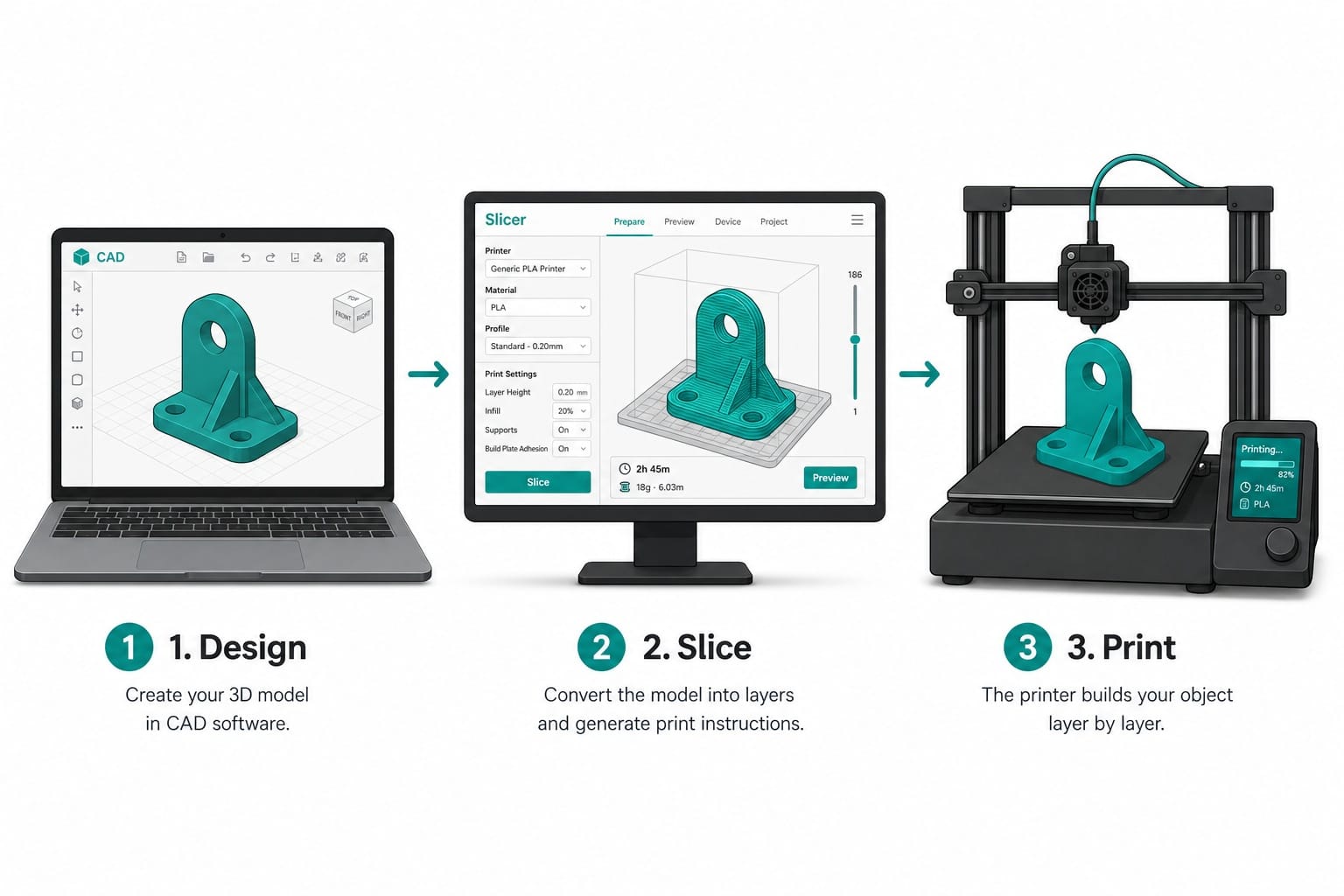
Every 3D print follows the same three steps, regardless of the printer or material.
Step 1: Create or Download a 3D Model
Everything starts with a digital 3D model. You can design one yourself using CAD software like TinkerCAD (free and browser-based, great for beginners) or Fusion 360 (more advanced). If you would rather skip the design phase, thousands of ready-to-print models are available for free on platforms like Thingiverse, Printables, and MakerWorld.
The model is saved as a file, usually in STL or 3MF format, which describes the shape as a mesh of tiny triangles.
Step 2: Slice the Model into Layers
A 3D printer cannot read a 3D model directly. You need a piece of software called a slicer that cuts the model into hundreds or thousands of horizontal layers and generates the exact instructions the printer will follow.
In the slicer you control settings like layer height (thinner layers produce smoother surfaces but take longer), infill density (how solid the inside is), and print speed. Popular slicers include Cura, PrusaSlicer, and Bambu Studio, all free.
Step 3: Print It Layer by Layer
You send the sliced file to the printer via USB, SD card, or Wi-Fi, and the machine builds the object one layer at a time. How each layer is formed depends on the type of 3D printing technology, which we will cover next.
A small model like a keychain might take 20 minutes. A larger object like a helmet could take 10 or more hours. The printer runs unattended for most of that time.
Types of 3D Printing Technology
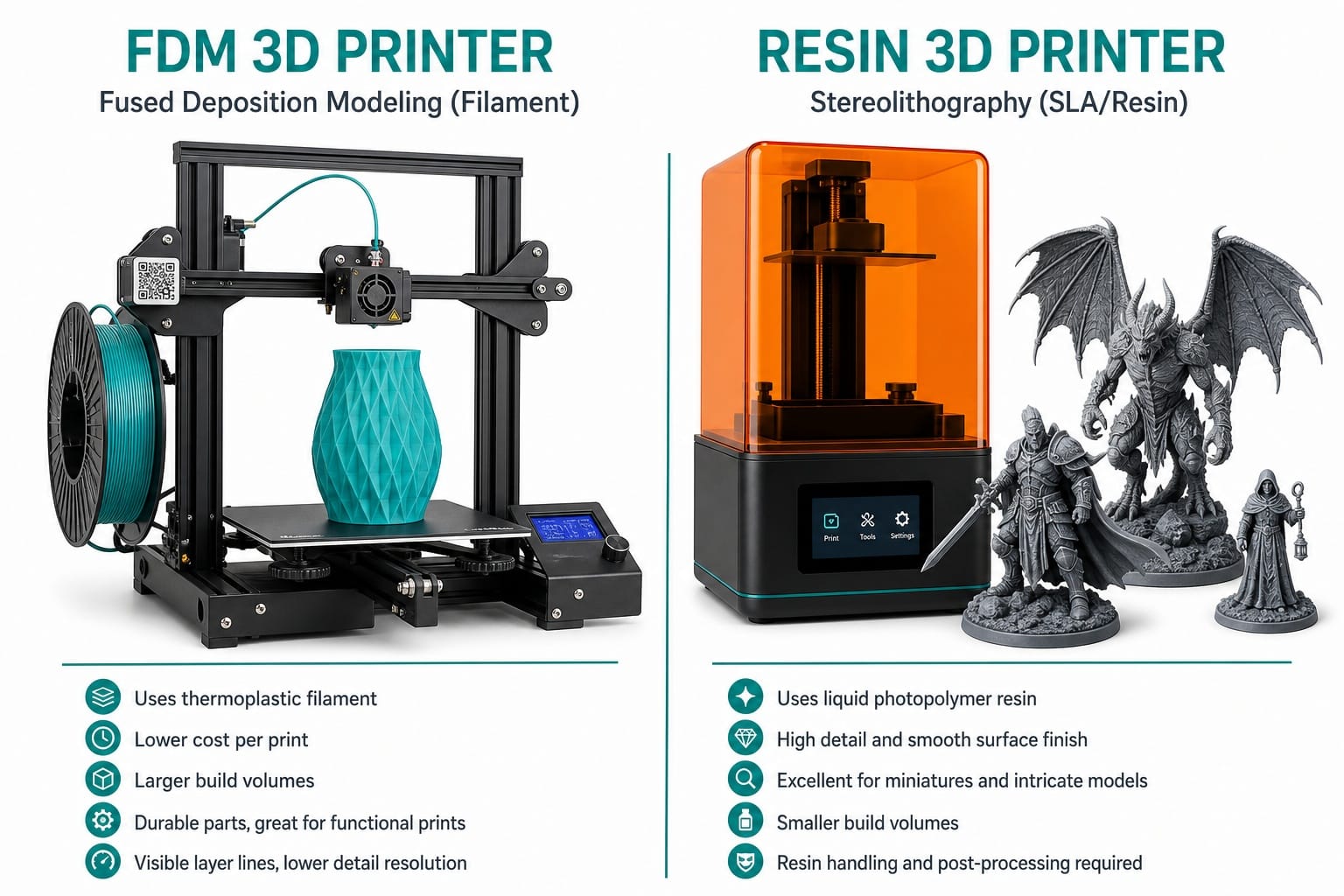
"3D printing" is an umbrella term. There are several distinct technologies underneath it, but as a beginner you only need to know three.
FDM (Fused Deposition Modeling)
FDM is the most common and most affordable type of 3D printing. A spool of plastic filament is fed into a heated nozzle, melted, and deposited layer by layer onto a build plate. Think of it like a very precise, computer-controlled hot glue gun.
FDM printers start around $200, use cheap materials ($20 per kilogram of PLA filament), and are the easiest to learn. This is where the vast majority of beginners start.
Resin Printing (SLA, DLP, MSLA)
The tradeoff: resin is messier (you work with liquid chemicals), requires post-processing (washing and UV curing), and the materials cost more. It is a great second printer, but most beginners find FDM an easier starting point.
Resin printers use UV light to cure liquid resin into a solid, one ultra-thin layer at a time. The result is much smoother and more detailed than FDM, which makes resin ideal for miniatures, jewelry, and dental models.
SLS (Selective Laser Sintering)
SLS uses a laser to fuse together fine particles of powder (usually nylon). It produces strong, functional parts with no support structures needed. However, SLS machines start around $30,000, so this is firmly in professional and industrial territory. You are unlikely to have one at home, but you may encounter SLS parts from online printing services.
Which Type Should Beginners Choose?
FDM. It is the cheapest, easiest, safest, and most forgiving technology to learn on. You can always add a resin printer later once you know what you are doing.
What Can You Make with a 3D Printer?
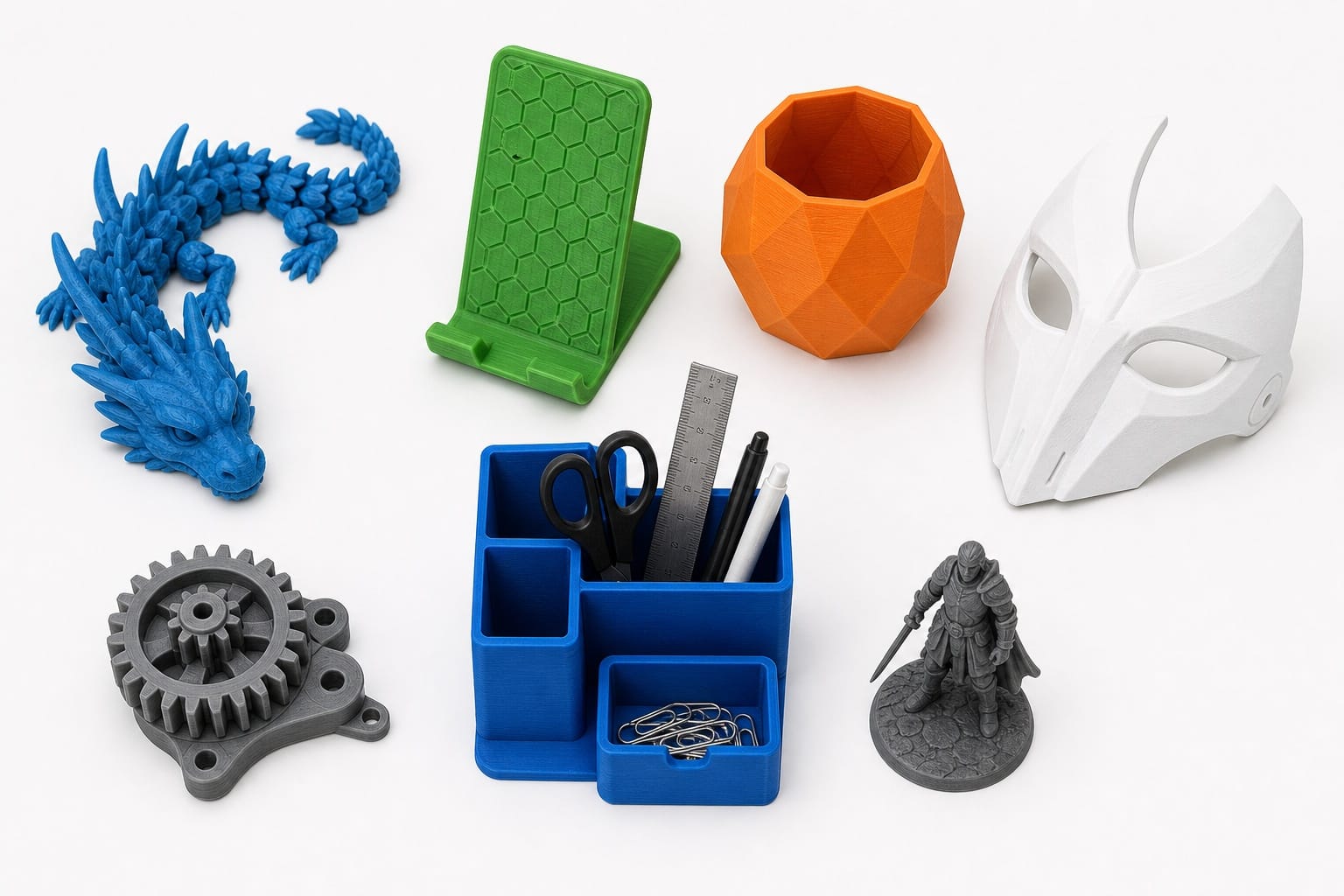
The short answer: almost anything that fits on the build plate. Here are the most common categories:
- Household items: drawer organizers, wall hooks, cable clips, shelf brackets, replacement knobs
- Toys and figurines: articulated dragons, action figures, board game pieces, fidget toys
- Cosplay and props: helmets, masks, armor pieces, replica weapons
- Functional parts: phone stands, camera mounts, custom jigs, broken appliance replacements
- Educational models: anatomy models, architectural prototypes, engineering demonstrations
- Art and decor: vases, lamps, lithophanes, geometric sculptures
At the industrial level, 3D printing is used for aerospace components, medical implants, dental aligners, automotive tooling, and even concrete houses, but that is a different world from what beginners will encounter.
Is 3D Printing Hard for Beginners?
Honest answer: easy to start, takes time to master.
Modern beginner printers (like the Bambu Lab A1 Mini or Creality Ender-3 V3) work nearly out of the box. Unbox it, load filament, send a test file, and you will likely have a successful first print within an hour. That part is genuinely simple.
The learning curve comes later: understanding why a print failed, tuning slicer settings for better quality, choosing the right material for a job, and designing your own models. Expect to feel comfortable with the basics in one to two weeks of casual use, and reasonably competent in one to two months.
The 3D printing community is enormous and beginner-friendly. YouTube tutorials, Reddit (r/3Dprinting), and manufacturer Discord servers mean you will almost never be stuck on a problem without help.
What You Cannot 3D Print
Legal Restrictions
3D printing is legal. What can get you in trouble is printing specific objects:
- Firearms and weapon components: illegal to manufacture without a license in most countries, and heavily regulated in the US.
- Copyrighted or trademarked items for sale: printing a figurine for yourself is generally tolerated, but selling 3D printed models of characters owned by Disney, Games Workshop, or other IP holders is infringement.
- The "Warhammer 40K" question: printing minis from pirated STL files for personal use lives in a legal gray area. Selling them is clearly illegal.
For personal, non-commercial use, you can print nearly anything that is not a weapon. Use common sense.
Practical Limitations
Beyond legality, there are things 3D printers simply do not do well:
- Mass production: 3D printing is slow per unit. If you need 10,000 identical parts, injection molding wins.
- Perfectly smooth surfaces: FDM leaves visible layer lines. Resin is smoother but still needs post-processing for a factory finish.
- Structural metal parts: desktop printers use plastics. Metal 3D printing exists but costs six figures.
- Size: most desktop printers have a build volume around 220 x 220 x 250 mm. Anything larger needs to be printed in sections and assembled.
3D Printing Materials at a Glance
- FDM filaments: PLA (easiest, cheapest, start here), PETG (stronger, slight heat resistance), ABS (durable but needs ventilation), TPU (flexible/rubbery), Nylon (tough, industrial)
- Resins: standard, tough, flexible, castable, dental-grade liquid photopolymers
- Industrial: metal powders (titanium, steel, aluminum), ceramics, carbon fiber composites, concrete
For your first printer and first few months, PLA filament is all you need. It is cheap (~$20/kg), prints easily, produces no harmful fumes, and works for 90% of beginner projects.
Advantages and Disadvantages of 3D Printing
| Advantages | Disadvantages |
|---|---|
| No molds or tooling needed | Slower than mass manufacturing |
| Complex geometries are free | Surface finish needs post-processing |
| Low cost for one-offs and small batches | Parts weaker than machined metal |
| Rapid design iteration | Learning curve for slicer settings |
| Huge range of materials | Build size limited by printer |
| Easy customization and personalization | Failed prints waste time and material |
3D printing is not a replacement for traditional manufacturing. It is a complement: best for prototypes, custom parts, low-volume production, and things that cannot be made any other way.
Frequently Asked Questions
What is 3D printing in simple words?
3D printing builds a physical object from a digital file by adding material one thin layer at a time, like stacking thousands of paper-thin slices on top of each other until the full shape appears.
How much does 3D printing usually cost?
A capable beginner setup (printer + filament + basic tools) costs $200 to $500. The filament itself costs about $20 per kilogram, and a kilogram makes dozens of small prints.
Is 3D printing just plastic?
No. While most home printers use plastic filament or resin, industrial systems print in metals (titanium, stainless steel, aluminum), ceramics, concrete, and even food like chocolate.
What is the biggest problem with 3D printing?
For beginners: failed prints and the learning curve around slicer settings. For industry: speed and consistency compared to traditional manufacturing methods.
Is 3D printing good or bad?
It is a tool. It enables rapid prototyping, reduces waste compared to subtractive manufacturing, and democratizes small-scale production. Like any tool, the outcome depends on how it is used.