3D Printing Warping: Why It Happens and How to Fix It
Struggling with 3D print warping? Learn what causes edges to lift, how to fix it step by step based on severity, and which settings prevent it from happening again.
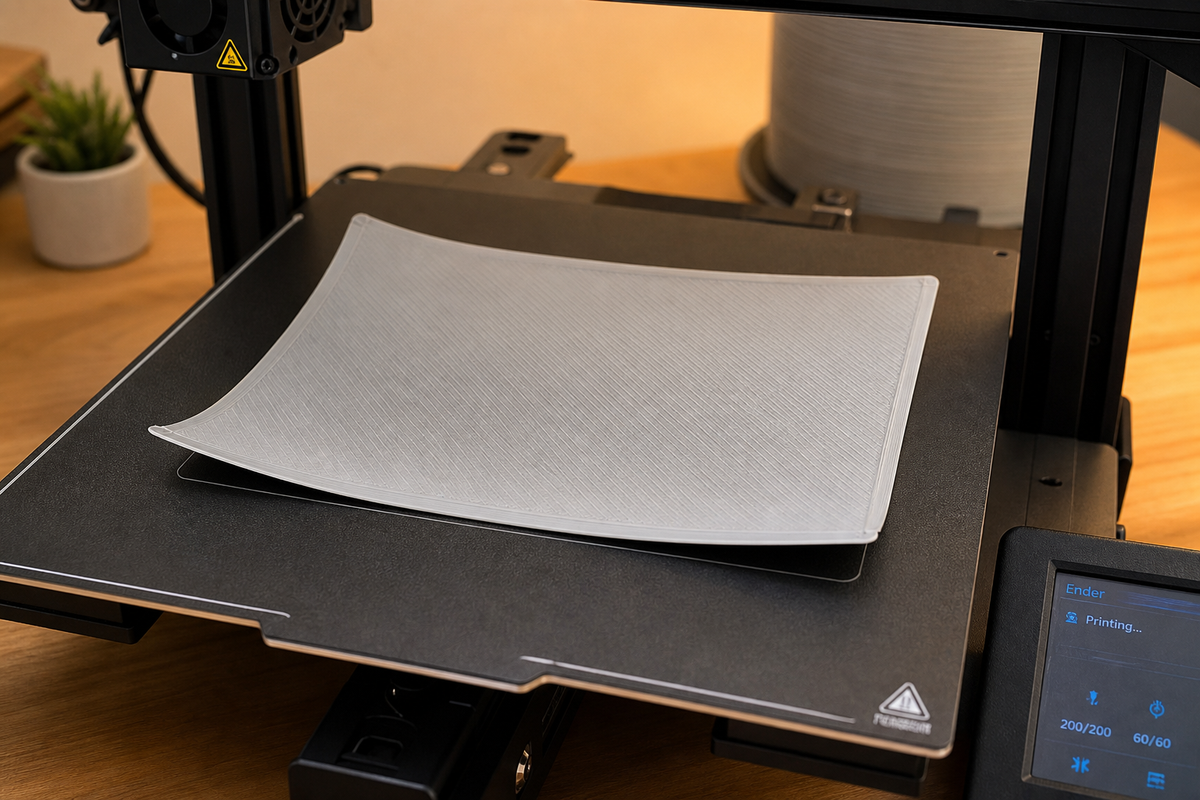
You come back to check on your print and notice the corners have curled up off the bed. The base is no longer flat. The print might still be going, but you already know the bottom is ruined.
This is warping, and it is one of the most common warping issues 3d printing beginners face. The good news: it is almost always fixable, and once you understand why it happens, it is largely preventable.
This guide explains the cause, helps you diagnose the severity, and gives you a clear fix-it path from the simplest solution to the nuclear option. No need to try everything at once. Start easy, escalate only if needed.
What Is Warping and Why Does It Happen?
Warping happens because plastic shrinks when it cools.
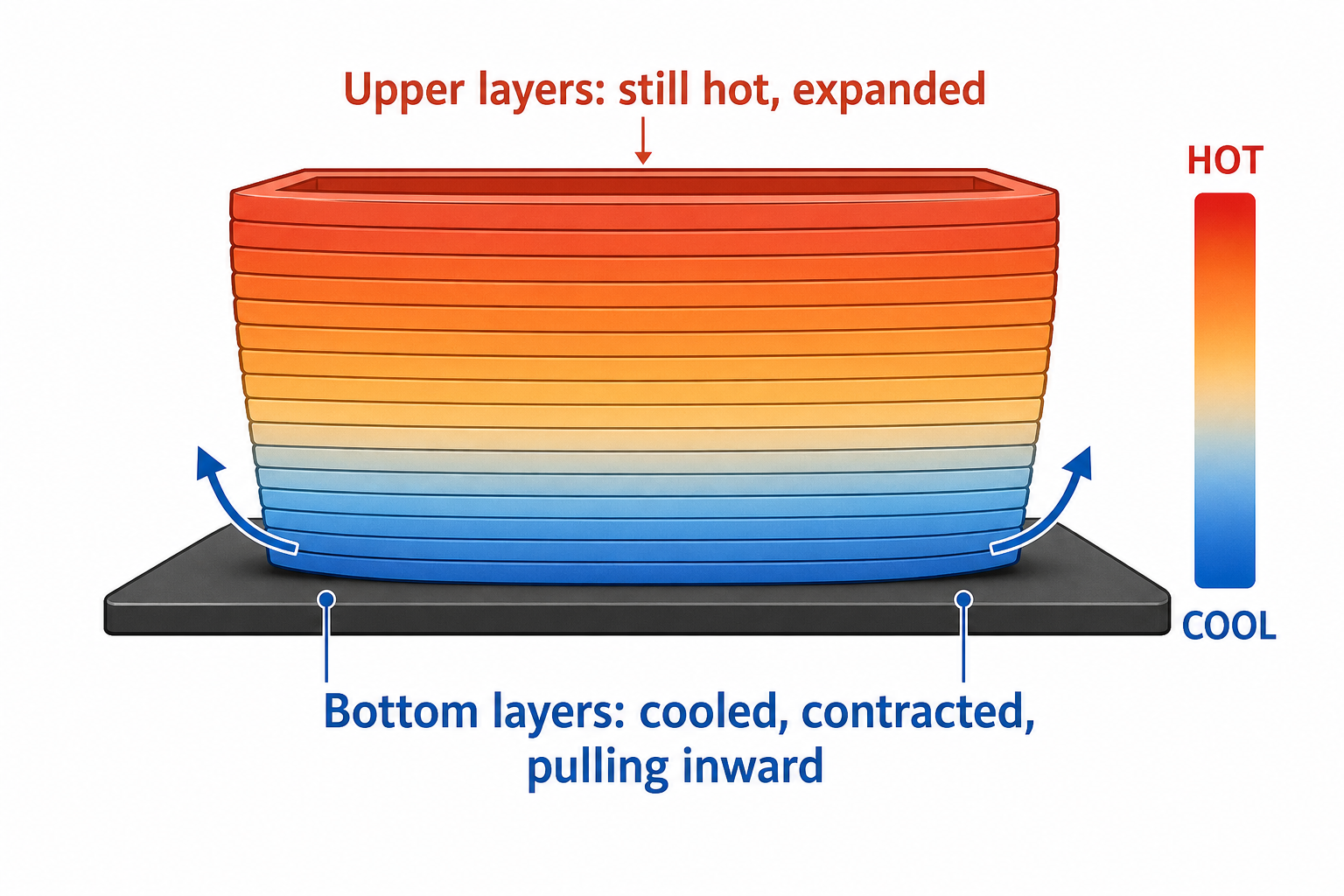
When your printer lays down hot filament, it is semi-liquid at around 200°C. As it cools to room temperature, it contracts. This contraction creates internal stress inside the printed part. The bottom layers, which cooled first and bonded to the bed, want to stay flat. The upper layers, cooling later, pull inward. This tug-of-war between layers creates a bending force that lifts the edges and corners off the build plate.
Three things make warping worse:
Large, flat parts. More surface area means more cumulative shrinkage force. A 20mm calibration cube rarely warps. A 200mm flat panel almost certainly will.
Sharp corners. Stress concentrates at corners because two shrinking edges meet at one point. Round shapes distribute stress more evenly.
Fast or uneven cooling. A cold draft hitting one side of the print cools it faster than the other, creating uneven shrinkage. This is why ABS warps badly in open-frame printers but prints fine in enclosed machines.
Understanding this single principle (cooling = shrinking = stress = lift) explains every warping issue you will ever encounter.
How to Tell If Your Print Is Warping (And Not Something Else)
Beginners often confuse warping with two other first-layer problems that look similar but have completely different fixes. Applying the wrong solution wastes time.
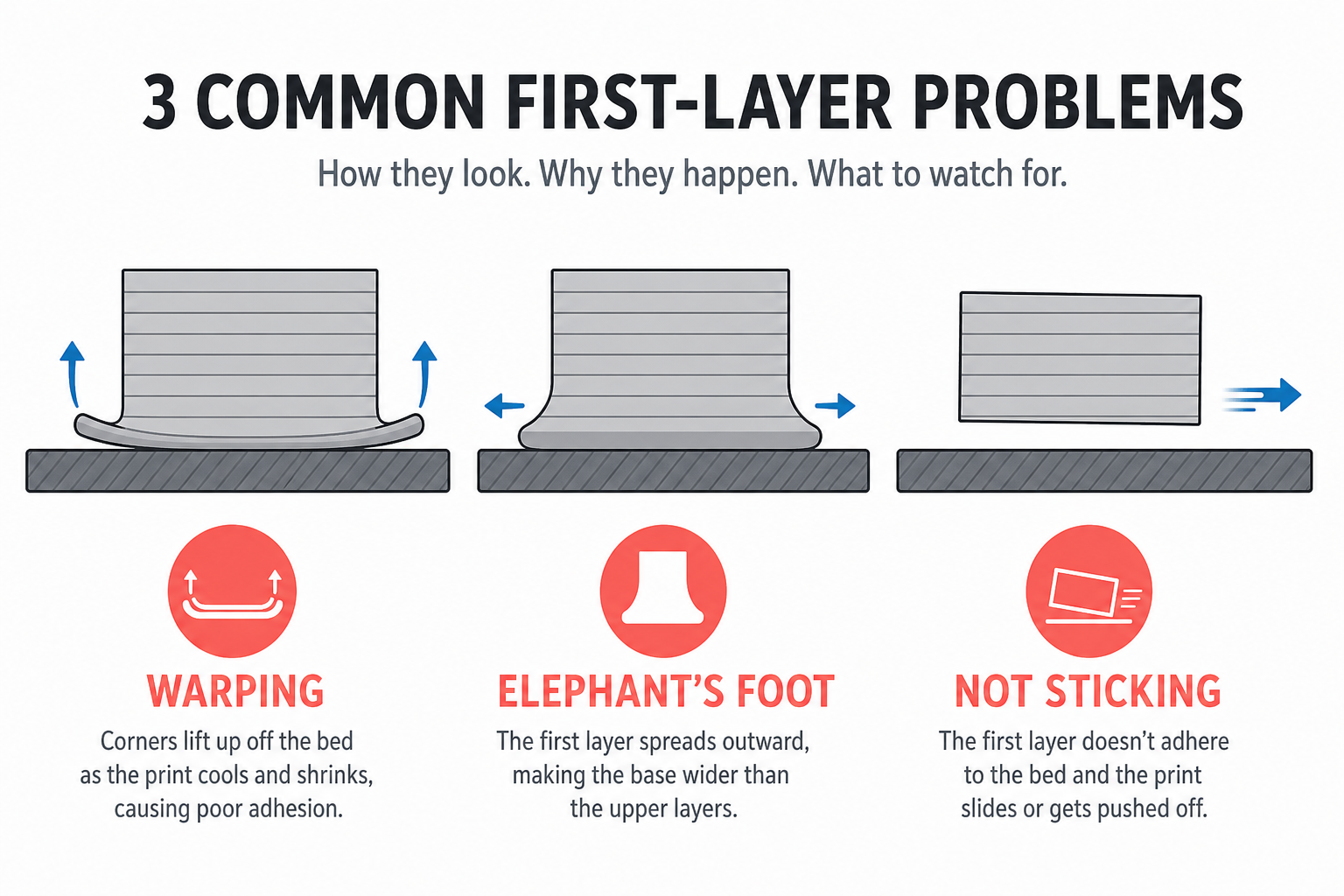
| Feature | Warping | Elephant's Foot | Not Sticking to Bed |
|---|---|---|---|
| What you see | Corners/edges curl upward off the bed | First layer bulges outward, wider than the rest | Print moves, slides, or detaches entirely |
| Direction | Up (away from bed) | Out (sideways expansion) | Off (no adhesion at all) |
| Main cause | Cooling shrinkage pulling edges up | Nozzle too close + bed too hot squishing first layer | Bed not level, dirty, or wrong temperature |
| Fix direction | Slow cooling, improve adhesion | Raise Z-offset slightly, lower bed temp 5°C | Re-level bed, clean with IPA, check temp |
If your corners are lifting upward, you have warping. Keep reading.
If your first layer is wider/fatter than the layers above it (looks like a squished base), that is elephant's foot, and you need to raise your nozzle height slightly or reduce bed temperature by 5°C.
What Causes Warping? (The 5 Main Culprits)
Most warping comes down to one of these five issues. Scan the list and see which matches your situation:
- Cooling too fast or unevenly. Your printer is near a window, a vent, or an air conditioner. A draft hits one side of the print, cooling it faster than the other. Even subtle airflow (someone walking past, a door opening) can cause this on large prints.
- Bed temperature too low. Each material needs a specific bed temperature to stay adhered. If the bed is too cool, the bottom layers lose grip and the shrinkage force wins.
- Poor bed adhesion. Fingerprints, dust, or residue on the print surface prevent the first layer from bonding properly. Without a solid grip, even mild shrinkage force pulls the print free.
- Material characteristics. Some plastics shrink more than others. ABS shrinks nearly 1.5% from printing temperature to room temperature. PLA shrinks less than 0.5%. Higher shrinkage = more warping force.
- Part geometry. Large flat surfaces, sharp 90-degree corners, and long thin shapes concentrate stress at the edges. A part with rounded corners and minimal flat area resists warping naturally.
How to Fix Warping (By Severity Level)
Instead of listing every fix in a random pile, here they are organized by how bad your warping actually is. Start at the top. Only escalate if the simpler fixes do not work.
Mild Warping: Slight Corner Lift, Print Still Usable
Your corners lift 0.5-1mm. The print finishes, but the base is not perfectly flat. You can probably still use the part.
Try these first (2-minute fixes):
- Clean the bed with isopropyl alcohol (90%+). Oils from your fingers are the most common hidden cause. Wipe before every print.
- Add a brim in your slicer (5-10mm width). A brim extends the first layer outward, giving more surface area to grip the bed. Peel it off after printing.
- Slow down the first layer speed to 15-20mm/s. Slower speed gives filament more time to bond to the surface.
- Verify bed temperature matches the filament. PLA: 55-60°C. PETG: 70-80°C. ABS: 100-110°C.
These four steps alone fix the majority of 3d print warping cases for PLA and PETG users.
Moderate Warping: Print Detaches Partially, Affects Dimensions
Corners lift 1-3mm. The print may partially pop off the bed mid-print, or finish but with noticeably distorted dimensions.
Add these measures:
- Increase bed temperature by 5-10°C beyond your normal setting. A warmer bed keeps the bottom layers expanded, reducing the differential with upper layers.
- Use an adhesion aid. Glue stick (PVA) is cheap and effective. Apply a thin, even layer. Hairspray works too. PEI spring steel sheets offer excellent grip without consumables.
- Turn off the part cooling fan for the first 3-5 layers. Rapid cooling of the initial layers is the biggest trigger for early warping.
- Increase initial layer height to 0.28-0.3mm. A thicker first layer creates a stronger bond and resists peeling forces better.
- Check for drafts. Move the printer away from windows, air vents, or doorways. Even a subtle breeze matters for large prints.
Severe Warping: Print Fails Completely or ABS/Nylon Material
The print detaches entirely mid-print, or you are using ABS/Nylon which warp aggressively regardless of your other settings.
Escalate to these solutions:
- Use an enclosure. This is the single most effective fix for severe warping. An enclosure traps heat around the print, keeping all layers warm and reducing the temperature differential. For ABS, this is practically mandatory.
- Switch to a less warp-prone material. If you are using ABS, ask yourself: do you genuinely need ABS properties? PETG gives you better layer adhesion, similar strength, and far less warping without an enclosure.
- Change part orientation. Rotate the model in your slicer so the largest flat surface faces the bed. This maximizes bed contact and minimizes stress at edges.
- Add a raft. A raft creates a thick multi-layer platform under your print. It absorbs warping stress so your actual part stays flat. Downside: rougher bottom surface.
- Split the model into smaller pieces. If a single large flat part keeps warping, cut it into smaller sections, print them separately, and glue them together. Smaller pieces have less cumulative shrinkage.
If you are working with ABS specifically, the combination of enclosure + high bed temperature (100-110°C) + brim + fan off for first 10 layers will handle most cases.
Can You Save a Warped Print?
You noticed the warping after the print finished. Is the part salvageable?
You can try to fix it when:
- The warping is mild (under 2mm of lift)
- The bottom surface is not a functional mating surface
- The part does not need precise dimensional accuracy
How to flatten a warped print:
- Heat the warped area with a heat gun or hair dryer (low setting, keep moving, do not hold in one spot)
- Once the plastic softens slightly, press the part flat against a hard, level surface
- Hold it down (clamp or weight) until it cools completely
- For PLA: hot water (60-70°C) also works. Submerge the warped area for 30 seconds, then press flat
Just reprint when:
- Warping exceeds 2mm
- The part has cracked or delaminated between layers
- The part needs to fit precisely with other components
- The warping distorted features on upper layers (not just the base)
Reprinting with the correct settings takes less time than fighting a severely warped part into shape. Adjust your settings using the fixes above, and the second print will come out flat.
Which Materials Warp the Most?
The People Also Ask section for this topic always includes "Is PLA or PETG more prone to warping?" Here is the full comparison:
| Material | Warping Tendency | Bed Temp | Enclosure Needed? | Beginner Verdict |
|---|---|---|---|---|
| PLA | Very low | 50-60°C | No | Safest choice. Rarely warps with basic settings. |
| PETG | Low | 70-80°C | No | Slightly more than PLA, but still easy to manage. |
| ABS | High | 100-110°C | Yes (strongly recommended) | Avoid unless you have an enclosure. |
| ASA | High | 100-110°C | Yes | Similar to ABS but UV-resistant. Same warping profile. |
| Nylon | Very high | 80-100°C | Yes | Advanced material. Major warping without enclosure + dry filament. |
| TPU | Very low | 40-60°C | No | Flexible, barely warps at all. |
The simple rule: if you are a beginner dealing with warping issues 3d printing, switch to PLA or PETG. These materials warp minimally with just a heated bed and clean surface. Save ABS and Nylon for when you have an enclosure and more experience.
Prevention Checklist (Stop Warping Before It Starts)
Run through this checklist before every print. It takes 60 seconds and prevents most warping issues:
- ☐ Bed wiped with isopropyl alcohol (clean surface)
- ☐ Bed temperature set correctly for this material
- ☐ First layer speed reduced (15-25mm/s)
- ☐ Brim enabled for parts wider than 100mm
- ☐ Part cooling fan off for first 3-5 layers
- ☐ Printer away from drafts (windows, AC vents, doors)
- ☐ Part oriented with largest flat surface on bed
- ☐ For ABS/Nylon: enclosure closed, pre-heated
If warping still occurs after checking all these boxes, the issue is almost certainly part geometry. Consider adding mouse ears (small discs at corners), splitting the model, or redesigning with rounded edges.
For more on getting your printer set up correctly from the start, see our beginner's guide to using a 3D printer.
 Editorial Team
Frequently Asked Questions
How to get rid of warping in 3D printing?
Start with the simplest fixes first: clean your bed with isopropyl alcohol, add a brim in your slicer, and verify your bed temperature matches the material. If that does not work, increase bed temp by 5-10°C, use a glue stick for adhesion, and turn off the cooling fan for the first few layers. For persistent warping with ABS or large parts, use an enclosure to maintain stable ambient temperature around the print.
Is PLA or PETG more prone to warping?
PETG is slightly more prone to warping than PLA, but both are considered low-warp materials. PLA barely warps at all with a heated bed at 55-60°C. PETG may show mild corner lift on large parts but is easily managed with a bed temperature of 70-80°C and a brim. Neither material requires an enclosure. If warping is your primary frustration, PLA is the safest choice.
How to fix warping issues?
Fix warping based on severity. For mild cases (slight corner lift), clean the bed and add a brim. For moderate cases (partial detachment), increase bed temperature, use adhesion aids like glue stick, and disable the fan for early layers. For severe cases (complete print failure or ABS), use an enclosure, add a raft, or switch to a lower-warp material like PETG. Always check for drafts near your printer.
Does gyroid infill help warping?
Gyroid infill can slightly reduce warping compared to rectilinear patterns because it distributes internal stress more evenly across the part rather than concentrating it along straight lines. However, infill type is not a primary warping fix. It has a minor indirect effect. Bed adhesion, temperature, and cooling management are far more impactful. If you are already using the other fixes and still see mild warping, switching to gyroid infill may help marginally, but it will not solve significant warping on its own.