Resin vs Filament 3D Printer: The Honest Comparison for Beginners
Resin or filament? This no-fluff comparison covers detail, strength, cost, safety, and what daily life actually looks like with each type — so you can pick your first 3D printer with confidence.
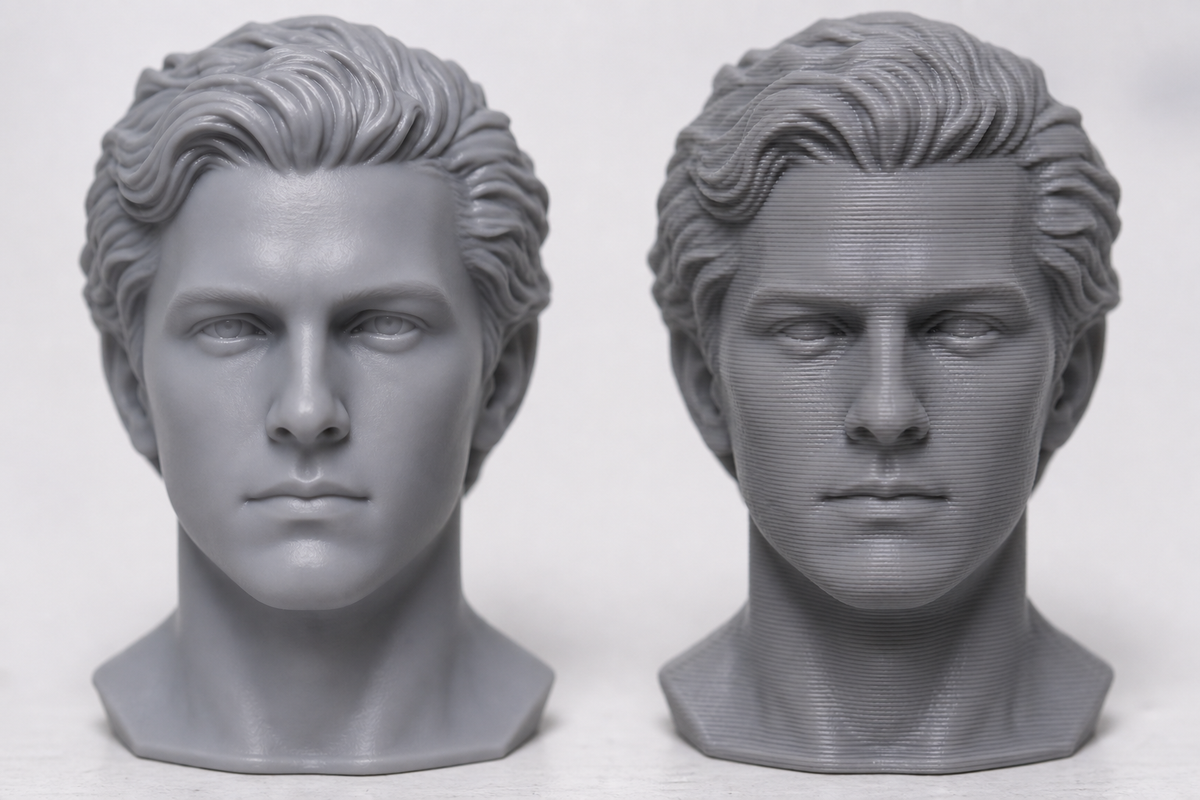
Choosing between a resin vs filament 3d printer is the biggest decision you'll make when getting into 3D printing. And most comparison articles bury you in spec sheets without telling you what it's actually like to own each type.
Here's the short version: resin printers make beautiful, detailed objects that are fragile. Filament printers make strong, functional objects that look rougher. Everything else — cost, safety, cleanup, noise, space — flows from that core difference.
This guide goes beyond specs. You'll get the full picture: what each technology does best, what your first week actually looks like, and which one fits your life — not just your project.
Quick Answer: Which One Should YOU Get?
Don't have time to read 3,000 words? Here's the decision logic:
- Miniatures, figures, jewelry, dental models → Get a resin printer
- Functional parts, tools, household items, large prints → Get a filament printer
- Limited budget (want lowest total cost) → Get a filament printer
- Small apartment, can't ventilate → Get a filament printer
- Classroom or kids involved → Get a filament printer
- Want both detail AND strength → Start with filament, add resin later
Still unsure? Keep reading — the details matter.
How Each Type Works (30-Second Explanation)
What Is a Resin Printer?
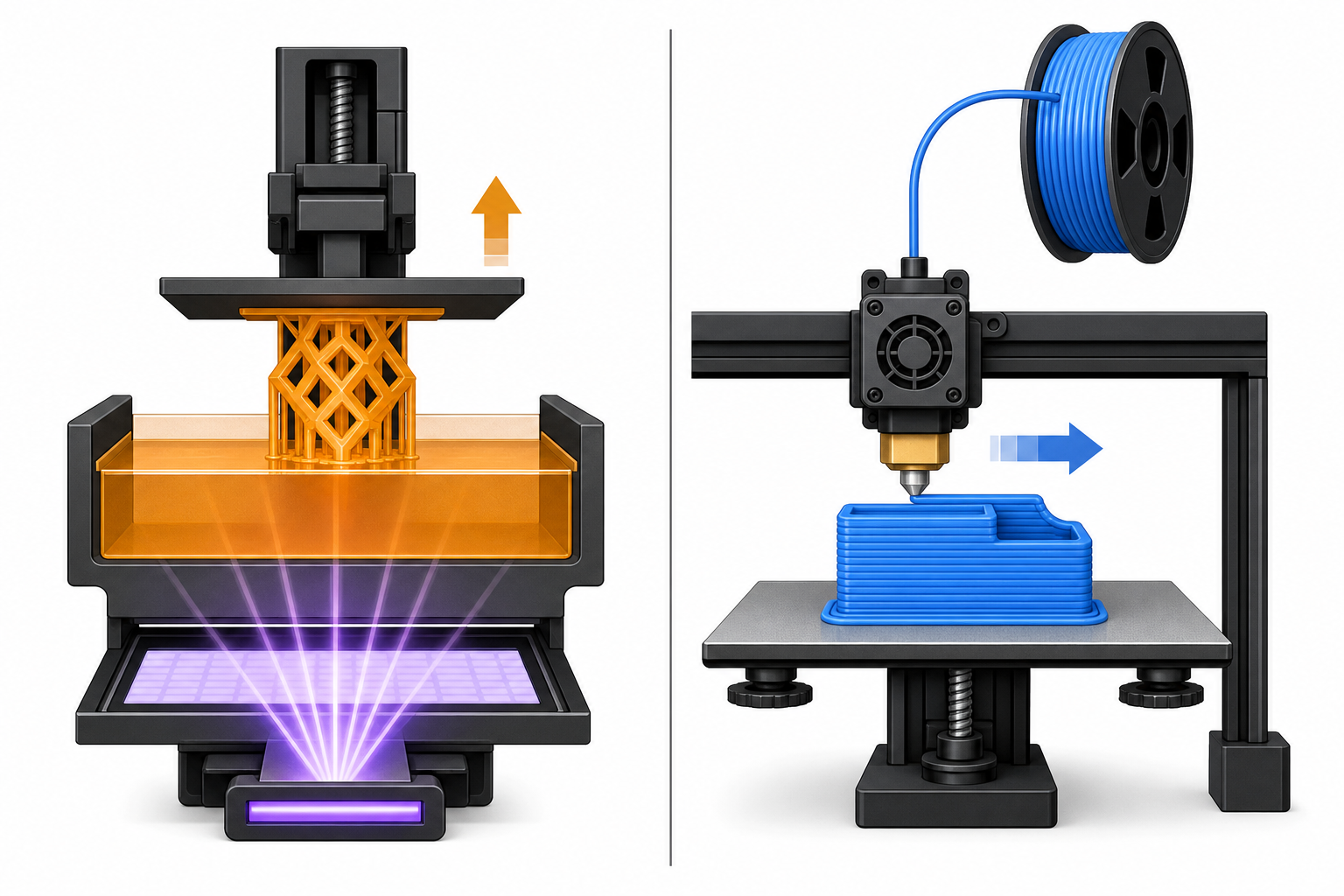
A resin 3d printer starts with a vat of liquid photopolymer — a chemical that hardens when hit by UV light. The printer projects UV light (via LCD screen or laser) onto the bottom of the vat, curing one paper-thin layer at a time. The build plate lifts up after each layer, and the process repeats — building the object upside-down, pulling it out of the liquid.
How does resin printing work in practice? Think of it like a photograph developing in reverse: light creates solid shapes from liquid. The result is incredibly fine detail — layers as thin as 0.025mm, invisible to the naked eye.
But here's the catch: after printing, you must wash the piece in isopropyl alcohol to remove uncured resin, then cure it under UV light to fully harden it. The liquid resin is toxic to skin and lungs before curing.
What Is a Filament Printer?
A filament printer (also called FDM or FFF) works like a computer-controlled hot glue gun. A spool of solid plastic "wire" (filament) feeds into a heated nozzle that melts it and draws it onto a flat bed, line by line, layer by layer. If you're new to this, our guide to FDM 3D printing explains the full process.
The result is a strong, functional object — but with visible horizontal lines where each layer sits on top of the previous one. You can feel them with your fingernail.
The upside: no toxic chemicals, minimal cleanup, and the whole process is far simpler. Load filament, hit print, come back when it's done.
The Real Differences (Head-to-Head Comparison)
Detail and Surface Quality
This is where resin dominates and it's not close.
| Aspect | Resin | Filament |
|---|---|---|
| Layer height | 0.025–0.05mm | 0.1–0.3mm |
| Surface finish | Glass-smooth, no visible lines | Visible layer lines, needs sanding |
| Fine detail | Captures eyelashes on a 28mm miniature | Struggles below 0.5mm features |
| Post-processing for smooth | None needed | Sanding, filler primer, or painting |
If you're printing tabletop miniatures, character figures, or anything where surface quality matters, resin is the clear winner. The difference between resin vs pla surface quality is immediately obvious when you hold both prints side by side.
Strength and Durability
This is where filament dominates — and it's not close either.
| Aspect | Resin (standard) | Filament (PLA/PETG) |
|---|---|---|
| Impact resistance | Brittle, shatters when dropped | Survives drops from desk height |
| Flexibility | Rigid, snaps under bending | Some flex before breaking |
| Functional use | Display only (standard resin) | Tools, brackets, mounts, gears |
| Heat resistance | Warps above 50–60°C | PLA: 55°C / PETG: 75°C / ABS: 100°C |
Engineering resins exist that improve strength, but they cost 2–3x more and still don't match basic filament materials like PETG or ABS for functional durability. A resin vs filament 3d printer choice for functional parts is always filament.
Print Size
| Resin | Filament | |
|---|---|---|
| Typical build volume | 130 × 80 × 160mm | 220 × 220 × 250mm |
| Large-format options | ~200 × 200mm (expensive) | 300 × 300 × 400mm+ (affordable) |
Resin printers are physically limited by LCD screen size. Filament printers scale up cheaply. If you want to print anything larger than a soda can, filament is the practical choice.
Speed
- Filament is faster for a single large object (modern printers hit 300–500mm/s)
- Resin is faster when you fill the entire build plate with many small items (the whole layer cures simultaneously regardless of how many objects are on the plate)
Practical example:
- One helmet → filament wins (8 hours vs 20+ hours on resin, piece by piece)
- 30 miniatures on one plate → resin wins (4 hours vs 30+ hours on filament, one at a time)
Cost (Equipment + Materials)
Here's the full first-year cost comparison:
| Cost Category | Filament Setup | Resin Setup |
|---|---|---|
| Printer | $200–400 | $200–400 |
| Material (first year) | $80–150 (4–6 spools at $20–30/kg) | $150–350 (3–5 bottles at $35–70/L) |
| Wash + cure station | Not needed | $80–150 |
| IPA (isopropyl alcohol) | Not needed | $30–50/year |
| Gloves, masks, FEP films | Not needed | $30–60/year |
| Total first year | $280–550 | $540–1,010 |
The printer itself costs about the same. It's everything around the printer that makes resin significantly more expensive to operate.
Ease of Use
Filament workflow: Load spool → Slice model in software → Print → Remove from bed → Done.
Resin workflow: Pour resin → Slice → Print → Remove from plate → Wash in IPA (5 min) → Dry → UV cure (5–10 min) → Clean build plate → Filter unused resin → Store safely → Dispose of IPA properly.
For beginners, filament is dramatically simpler. Resin isn't hard, but it adds 15–20 minutes of handling around every single print.
Safety
| Filament (PLA) | Resin (uncured) | |
|---|---|---|
| Skin contact | Safe | Toxic — causes irritation, sensitization |
| Fumes | Minimal, non-toxic | Chemical odor, requires ventilation |
| Gloves needed | No | Yes, always |
| Kid-safe | Yes | No |
| Can use in living space | Yes | Not recommended without ventilation |
What is a resin printer good for? Incredible detail — but it demands respect for chemical safety that filament simply doesn't require.
What Your First Week Actually Looks Like
This is what nobody tells you in spec-sheet comparisons.
First Week with a Filament Printer
Day 1: Unbox, plug in, run auto-level (or manual paper test), load PLA spool, print the test model that came on the SD card. Takes 1–2 hours. It works. You're impressed.
Day 2–3: Download a phone stand from a free model site and print it. 3 hours later, you have something useful. Maybe encounter bed adhesion issues — fixed in 2 minutes with a glue stick.
Day 5–7: You've printed 4–5 things. Your desk has some cool objects. Total mess: one small string of plastic you snipped off. The printer buzzes in the background and you've mostly tuned it out.
Feelings: Productive, fun, mild learning curve. Family thinks it's cool.
First Week with a Resin Printer
Day 1: Unbox, level build plate (fiddly), pour resin into vat (wear gloves!), print test model. 2 hours print time. Then: wash in IPA, cure under UV lamp, admire the ridiculous detail. Impressive.
Day 2–3: Print miniatures. Quality is stunning. But you're going through gloves fast, your hands have an IPA smell, and there's a chemical odor in the room even with a window open.
Day 5–7: You've printed a dozen miniatures. They look amazing. But your desk now has: gloves, paper towels, IPA bottles, a wash station, a cure station, resin bottles stored away from sunlight. You've accidentally touched uncured resin twice. The smell bothers your roommate/partner.
Feelings: Amazed by quality, slightly exhausted by process. Considering moving the printer to the garage.
Does Resin Last Longer Than Filament?
This PAA question confuses two things: print strength and print longevity. Let's separate them:
| Aspect | Resin Print | Filament Print |
|---|---|---|
| Drop test | Shatters (standard resin) | Survives (PLA/PETG) |
| Lifespan on shelf (indoors) | Years, no issue | Years, no issue |
| UV sunlight exposure | Yellows and becomes brittle over months | PLA: heat-softens in sun; PETG/ABS: fine |
| Moisture resistance | Good | Good (except Nylon) |
| Material shelf life (unused) | 12–18 months (liquid resin expires) | 2+ years (if kept dry) |
Bottom line: Filament prints are more durable for functional use. Both last equally well as display pieces kept indoors. Resin degrades faster in direct sunlight. And unused liquid resin has a shorter shelf life than filament spools.
Is Resin Still Toxic After Cured?
This is one of the most important questions for beginners, especially if you plan to display prints at home or give them as gifts.
Uncured resin (liquid): YES — toxic. Causes skin irritation, allergic sensitization with repeated contact, and emits fumes. Never touch with bare hands. Never pour down a drain.
Fully cured resin (solid, after UV curing): Considered safe to handle with bare hands. The photopolymer reaction is complete — it's essentially inert plastic at this point.
Important nuances:
- NOT food-safe, even after curing. Don't make cups or utensils.
- Safe to display on any shelf, desk, or bookcase in your home.
- Safe to handle during painting, gaming (miniatures), etc.
- Jewelry against skin for extended periods: debatable — most users report no issues, but hypersensitive individuals may react.
- Resin dust from sanding cured prints IS hazardous — always wet sand and wear a mask.
Disposal: Never pour liquid resin into sink or toilet. Cure it first (leave uncovered in sunlight until solid), then discard in regular trash.
Noise and Space: The Stuff Nobody Tells You
Noise
| Printer Type | Noise Level | What It Sounds Like |
|---|---|---|
| Filament (standard) | 45–55 dB | Persistent hum + clicking. Like a loud desk fan. Noticeable in same room. |
| Filament (high-speed/enclosed) | 50–60 dB | Louder buzzing during fast moves. Close a door and it's fine. |
| Resin | 30–40 dB | Near silent. Gentle Z-axis motor hum every few seconds. Barely audible. |
If you want to print overnight in your bedroom, resin is surprisingly quiet. Filament printers will keep light sleepers awake (unless enclosed and placed behind a door).
Space Requirements
Filament printer needs: The printer (~40×40cm) + a filament spool. That's it. Total footprint: one desk corner.
Resin printer needs: The printer (25×25cm) + cure station (~20×20cm) + IPA container + paper towels + gloves + well-ventilated location. Total footprint: a dedicated shelf or table section, ideally near a window or in a garage.
Ventilation
- Filament (PLA): Zero ventilation needed. Safe to use in sealed room.
- Filament (ABS): Needs ventilation or enclosure with filter.
- Resin: MUST have airflow. An open window minimum; exhaust fan ideal. Some resins (especially cheap ones) smell strongly enough to make a closed room unpleasant in 30 minutes.
If you cannot provide ventilation, do not buy a resin printer. This single requirement eliminates resin for many apartment dwellers.
Best Use Cases
Resin Printer Is Best For
- Tabletop miniatures (D&D, Warhammer, display bases) — this is what resin was born for
- Character figures and statues — anime figures, busts, detailed sculptures
- Jewelry masters — ring prototypes for casting in metal
- Dental models — aligners, crowns, surgical guides
- Tiny mechanical prototypes — where dimensional accuracy under 0.1mm matters
Filament Printer Is Best For
- Functional parts — brackets, mounts, tools, cases, gears
- Large prints — cosplay armor, drone frames, enclosures
- Household items — hooks, organizers, drawer dividers, repairs
- Rapid prototyping — testing form and fit before final production
- Education — classrooms, kids, learning design thinking
- Anything that needs strength — if it might get dropped, stepped on, or stressed, use filament
Can You Own Both? (The Hybrid Approach)
Yes — and many makers end up here after their first 6–12 months. The two technologies complement each other perfectly:
- Print a figure's body in filament (strong, large, cheap) → Print the face and hands in resin (detailed, smooth) → Glue together
- Print a functional mechanism in filament → Print decorative covers in resin → Assemble
- Use filament for daily quick prints → Save resin for special projects where detail matters
Budget path:
- Start with a filament printer ($200–300) — learn the basics, print useful things
- After 3–6 months, once you know you want detail, add a resin printer ($200–300)
- Total invested: $400–600 for a complete workshop that covers every use case
This two-step approach means you never waste money on a printer that doesn't fit your life — you discover your needs first, then expand.
Best Starter Printers for Beginners
If you've read this far and decided which type is right for you, here are two specific machines we'd recommend as your first printer in each category.
Filament Pick: Bambu Lab A1 Mini
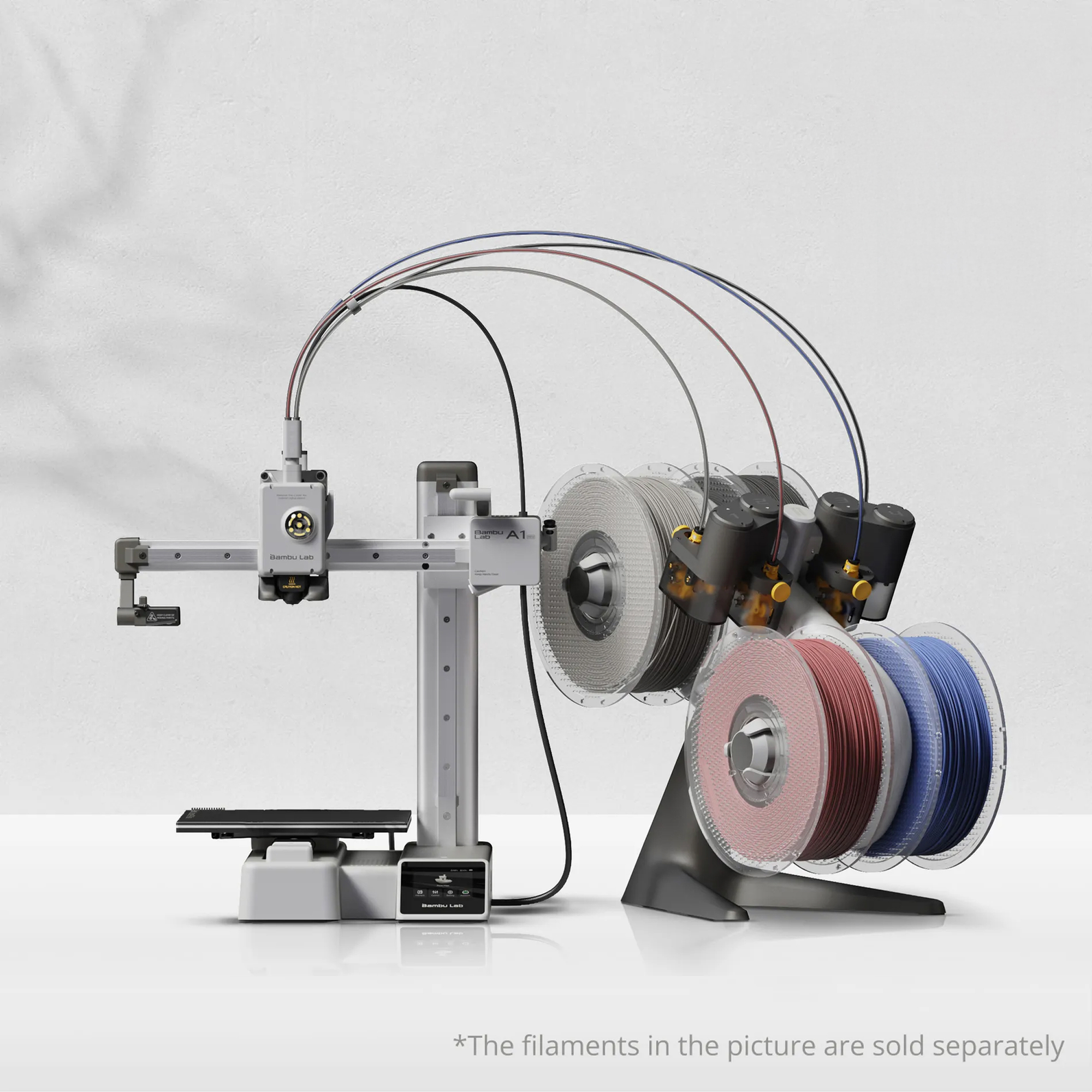
The A1 Mini is the easiest filament printer a beginner can buy today. It auto-levels itself, calibrates flow automatically, and starts printing reliably out of the box with almost zero setup. The build volume (180 × 180 × 180mm) is large enough for most beginner projects — phone stands, organizers, small cosplay pieces, and mechanical parts.
Why beginners love it:
- Fully automatic calibration (no manual bed leveling)
- Fast printing speed (up to 500mm/s) means shorter wait times
- Extremely quiet for a filament printer
- The companion slicer (Bambu Studio/Handy) is beginner-friendly with one-click print profiles
- Priced around $200 — low commitment for a genuinely capable machine
It handles PLA, PETG, and TPU without fuss. If you just want to start printing functional stuff without fighting your printer, the A1 Mini removes nearly all the friction.
Resin Pick: Elegoo Mars 5 Ultra
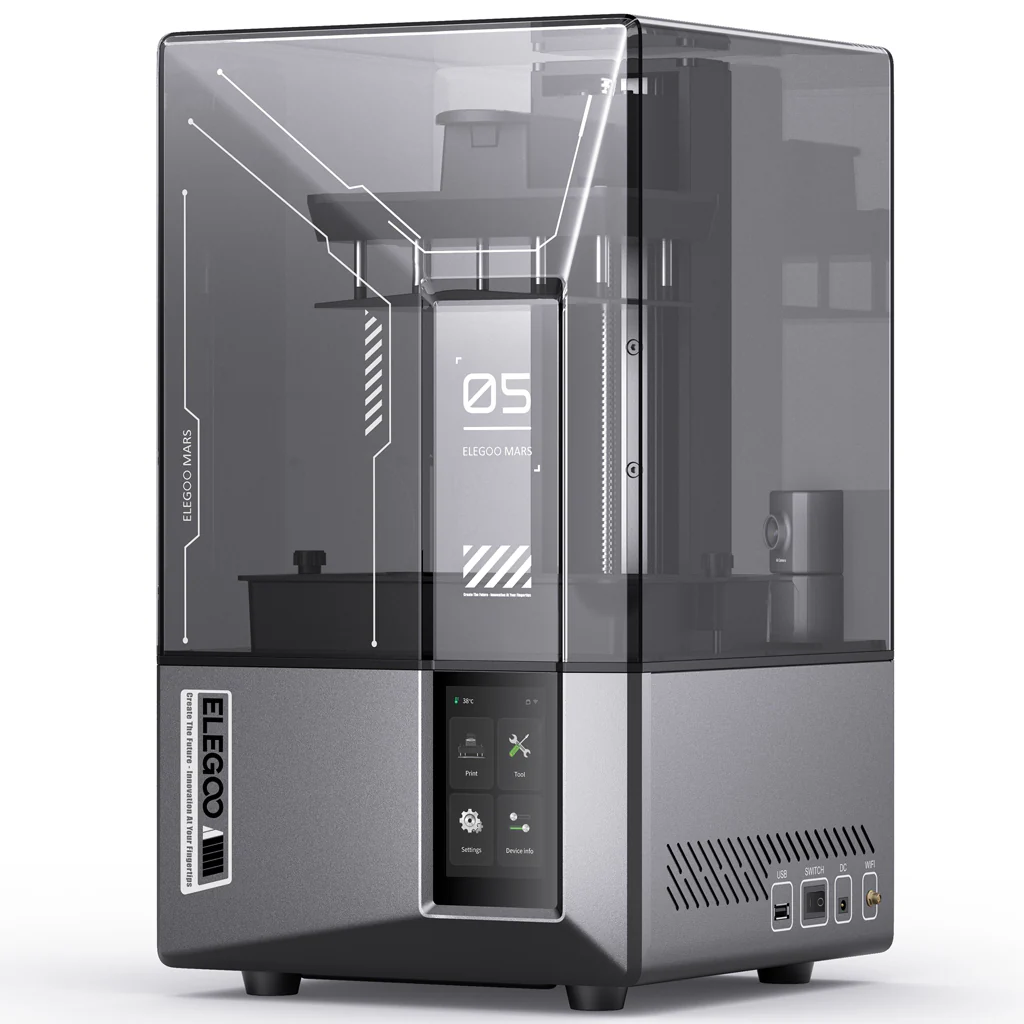
For resin, the Elegoo Mars 5 Ultra hits the sweet spot between price, quality, and ease of use. It's a MSLA printer with a 7-inch 4K mono screen, which means sharp detail and fast layer exposure times.
Why beginners love it:
- Excellent print quality for miniatures and figures right out of the box
- Built-in air purifier helps manage resin odor (though ventilation is still recommended)
- Tilting vat design reduces peel force — fewer failed prints
- Wi-Fi connectivity for sending prints without SD cards
- Priced around $250 — affordable entry point for resin with modern features
Pair it with a wash-and-cure station (Elegoo Mercury Plus 3 or similar, ~$80) and a bottle of water-washable resin for the least messy resin workflow possible as a beginner.
Quick Comparison
| Bambu Lab A1 Mini | Elegoo Mars 5 Ultra | |
|---|---|---|
| Type | Filament (FDM) | Resin (MSLA) |
| Best for | Functional prints, learning, everyday use | Miniatures, figures, detailed models |
| Build volume | 180 × 180 × 180mm | 132 × 74.5 × 150mm |
| Price | ~$200 | ~$250 |
| Setup time | ~15 min | ~30 min |
| Running cost | Low ($20/kg filament) | Higher ($35–70/L resin + IPA + supplies) |
| Ventilation needed | No (PLA) | Yes |
Either one is a solid first printer. If you're still torn, start with the A1 Mini — the lower running cost and simpler workflow let you learn the basics of 3D printing without chemical safety concerns. You can always add a resin printer later when you know you need that extra detail.
FAQ
What are the downsides of a resin 3D printer?
The main downsides: (1) toxic liquid resin requires gloves, ventilation, and careful handling; (2) post-processing adds 15–20 minutes per print (wash + cure); (3) prints are brittle and break easily; (4) build volume is small; (5) total cost of ownership is higher due to IPA, FEP films, and cleaning supplies; (6) resin expires on the shelf in 12–18 months. Resin printers make stunning objects, but they demand more effort, space, and safety awareness than filament printers.
What is the holy grail of 3D printing?
The "holy grail" would be a printer that combines resin-level detail with filament-level strength, at filament-level cost, with zero toxic chemicals and zero post-processing. It doesn't exist yet. The closest we've gotten: high-resolution filament printers (like 0.1mm layer height with ironing) bridge some of the detail gap, and engineering resins bridge some of the strength gap. But for now, you're always choosing between detail and durability — which is exactly why many makers own both types.
Does resin last longer than filament?
For print durability in daily use, filament wins — it's tougher, more flexible, and resists impact. For display longevity indoors, both last equally (years without degradation). In direct sunlight, resin yellows and becomes brittle faster than filament. And for material shelf life, filament spools last 2+ years stored dry, while liquid resin expires in 12–18 months. So in most senses of "lasting longer," filament has the edge.
Is resin still toxic after cured?
No — fully cured resin is considered safe to handle with bare hands. Once the UV curing process is complete, the material is inert plastic. You can safely display cured resin prints anywhere in your home, handle them during painting or gaming, and give them as gifts. However: cured resin is NOT food-safe, and sanding cured resin creates hazardous dust (wet sand with a mask). The toxicity concern applies only to uncured liquid resin and the fumes during printing.