How Long Does 3D Printing Take? A Realistic Guide with Actual Print Times
A realistic guide to 3D printing times with exact numbers for 20+ common objects. Covers what affects print time, how to check before printing, how to speed things up, and whether you can run a printer overnight.
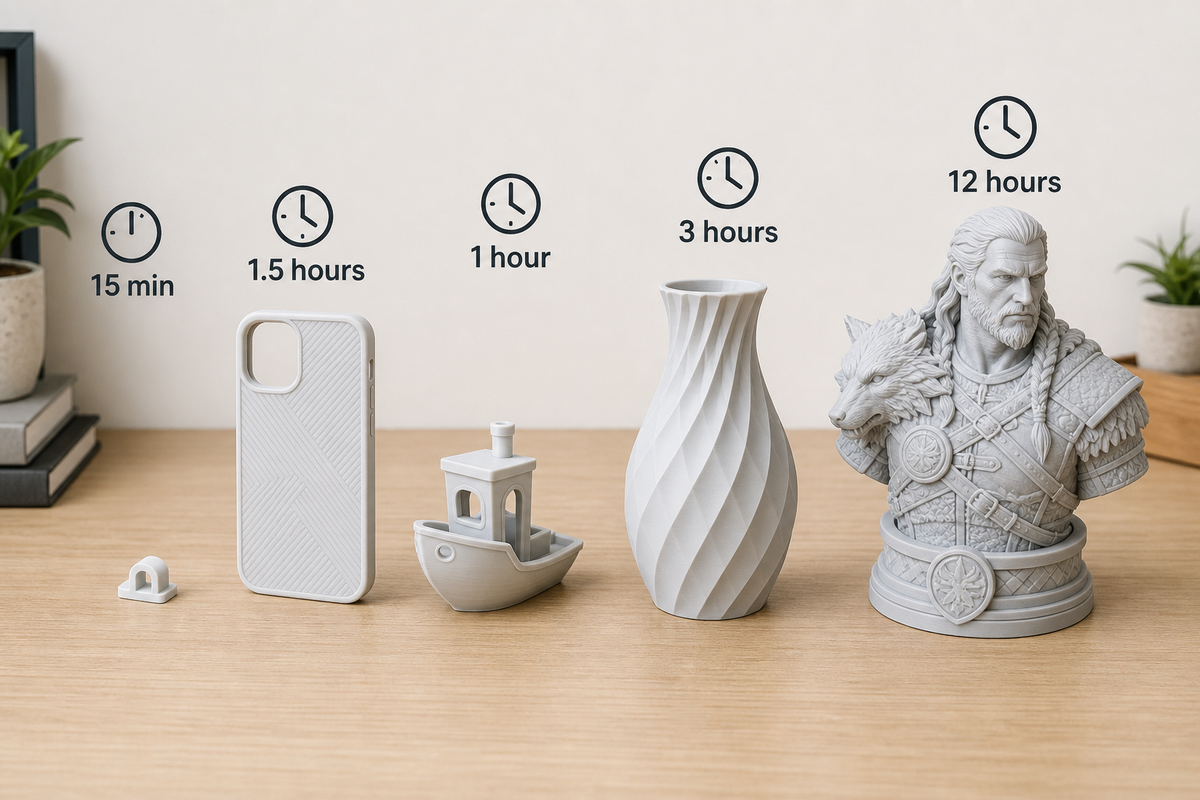
The short answer: most hobby 3D prints take between 30 minutes and 12 hours. A small clip or hook prints in 15 minutes. A phone case takes about 90 minutes. A detailed figurine might run 8 to 12 hours. And a full-size cosplay helmet? Plan for 24 to 36 hours, usually split across multiple prints.
But "it depends" is not a very helpful answer when you are trying to decide whether to start a print before bed or before work. So instead of vague estimates, this guide gives you actual print times for 20+ common objects, explains exactly what makes prints faster or slower, and shows you how to check the time before you hit "Print."
How Long Does It Take to 3D Print Common Objects?
Here are realistic print times for objects beginners commonly print. All times assume a modern FDM printer (Bambu Lab A1 Mini, Creality Ender 3 V3, or similar) using PLA filament.
"Normal" settings: 0.20mm layer height, 15% infill, 100-150mm/s print speed
"Fast" settings: 0.28mm layer height, 10% infill, 200-300mm/s on a high-speed printer
| Object | Approximate Size | Normal Time | Fast Time |
|---|---|---|---|
| Cable clip / hook | 30x15x10mm | 12-18 min | 6-10 min |
| Guitar pick | 30x25x1mm | 5-8 min | 3-5 min |
| Keychain | 50x30x5mm | 15-25 min | 8-15 min |
| Carabiner | 80x40x8mm | 30-45 min | 15-25 min |
| Phone stand | 100x80x70mm | 1h 30min - 2h | 45min - 1h 15min |
| Phone case | 150x75x12mm | 1h 15min - 1h 45min | 40-55 min |
| 3D Benchy (test boat) | 60x31x48mm | 1h - 1h 15min | 35-50 min |
| Small figurine (50mm) | 50mm tall | 1h 30min - 2h 30min | 50min - 1h 30min |
| Desk organizer | 120x80x60mm | 2h - 3h 30min | 1h 15min - 2h |
| Vase (spiral mode) | 150mm tall | 1h 30min - 2h 30min | 1h - 1h 45min |
| Articulated dragon | 200mm long | 4h - 6h | 2h 30min - 4h |
| Large figurine (150mm) | 150mm tall | 8h - 14h | 5h - 9h |
| Chess piece (single king) | 70mm tall | 1h 15min - 2h | 40min - 1h 15min |
| Full chess set (32 pcs) | 32 pieces total | 28h - 42h | 18h - 28h |
| Planter / pot | 120x120x100mm | 4h - 7h | 2h 30min - 4h 30min |
| Lithophane (photo print) | 100x100x3mm | 1h 30min - 3h | Not recommended (quality matters) |
| Cosplay mask (half) | 180x150x100mm | 10h - 16h | 6h - 10h |
| Full helmet (split in parts) | ~250mm | 24h - 40h total | 16h - 28h total |
| Laptop stand | 250x200x50mm | 5h - 8h | 3h - 5h |
| Shelf bracket (pair) | 100x100x30mm each | 2h - 3h per piece | 1h - 2h per piece |
Important notes:
- These ranges exist because different models within the same category vary in complexity and wall structure
- "Fast" times require a 2024-2026 generation printer with high-speed capability. Older printers (original Ender 3, Prusa MK3) will be closer to "Normal" times even with fast settings
- Resin printers (SLA/LCD) have different time profiles, covered in a section below
What Factors Affect How Long 3D Prints Take?
Understanding these five variables lets you predict whether a print will take 30 minutes or 30 hours.
Layer Height (The Single Biggest Factor)
Layer height is the thickness of each horizontal layer the printer lays down. Thinner layers mean more layers to complete the same object, which means more time.
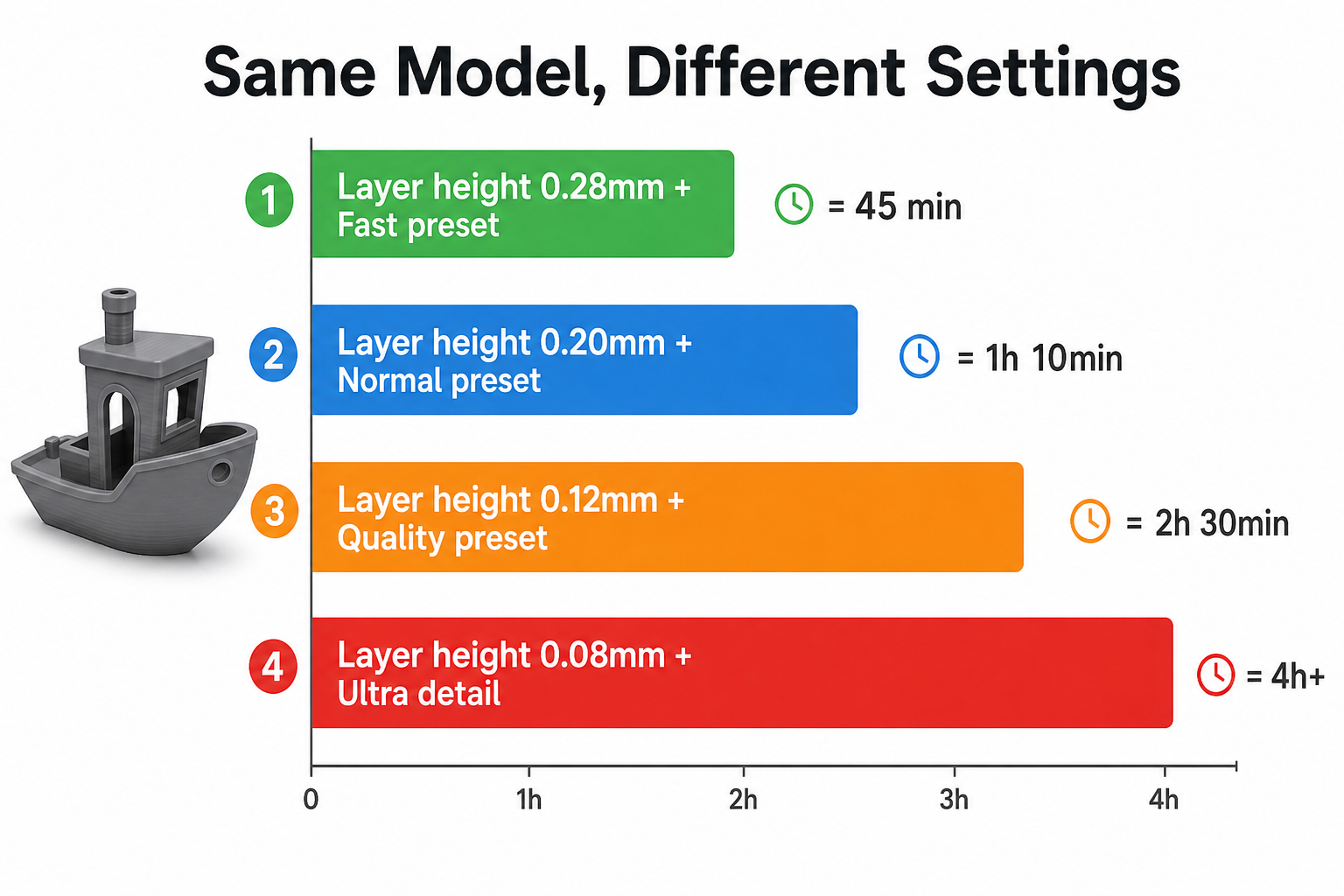
| Layer Height | Quality | Speed Impact | Best For |
|---|---|---|---|
| 0.08mm | Ultra-fine, nearly invisible layers | 4-5x slower than standard | Miniatures, jewelry, display pieces |
| 0.12mm | High quality, minimal layer lines | 2-3x slower | Detailed models, presentation prints |
| 0.20mm | Standard quality, good balance | Baseline | Everyday prints, functional parts |
| 0.28mm | Visible layers, rough surface | 30-40% faster | Prototypes, internal parts, speed prints |
| 0.32mm | Very visible layers | 40-50% faster | Rough prototypes only |
Why this matters: Your slicer's estimated print time usually does not include startup time. If Bambu Studio says "1 hour 10 minutes," the actual time from pressing Print to holding the finished object is closer to 1 hour 17 minutes.
Printers with a heated chamber (like enclosed models used for ABS/ASA) take even longer to pre-heat, sometimes 10-15 minutes for the chamber to reach temperature.
How to Check Print Time Before You Print
Every slicer shows you an estimated print time after slicing. You do not need to guess.
Bambu Studio / OrcaSlicer:
- Slice your model (click the "Slice plate" button)
- The estimated time appears at the bottom of the screen, alongside filament weight and cost
- Time estimate includes travel moves and retractions, so it is fairly accurate (within 5-10%)
Cura:
- After slicing, the time estimate appears at the bottom right corner
- Cura also shows filament length and weight used
- Accuracy: within 10-15% on most printers
PrusaSlicer:
- After slicing, time and filament estimates appear below the preview window
- PrusaSlicer tends to be conservative (actual time often slightly shorter)
Online 3D printing time calculators: If you want a rough estimate before even opening a slicer, tools like "3D Printing Time Calculator" websites let you input basic parameters (layer height, speed, model dimensions) and get a ballpark time. These are less accurate than your slicer but useful for quick planning.
Pro tip: Before committing to a long print, always check the time estimate in your slicer first. If it says 18 hours and you were hoping for 3, you know to adjust settings or reconsider the model before wasting filament.
How to Speed Up Your 3D Prints
Here are practical changes that have the most impact on how long does 3d printing take for your projects, ranked by effectiveness.
Settings You Can Change Right Now
1. Increase layer height (saves 25-40%) Switch from 0.20mm to 0.28mm for non-cosmetic prints. This is the single fastest way to cut time. Surface quality drops but strength stays similar.
2. Lower infill density (saves 10-20%) Drop from 20% to 10-12% for decorative items or prints that do not bear load. See our infill guide for which density to use when.
3. Reduce wall count (saves 5-15%) Going from 3 walls to 2 walls speeds things up. For decorative prints, 2 walls at 15% infill is usually strong enough.
4. Remove unnecessary supports (saves 15-30%) Rotate your model to minimize overhangs. Many prints can be oriented to avoid supports entirely. Check our supports guide for design strategies.
5. Use your slicer's "Fast" or "Draft" preset (saves 20-40%) Most slicers include speed presets that automatically adjust layer height, speed, and acceleration. Bambu Studio's "0.28mm Speed" profile is excellent for quick prints.
Use a Faster Printer
If you are still using a printer from before 2023, upgrading to a modern high-speed printer is the single largest time improvement available. The difference is dramatic:
| Printer | Benchy Time | Generation |
|---|---|---|
| Creality Ender 3 (original) | 2h 30min+ | 2018 |
| Prusa MK3S+ | 1h 45min | 2020 |
| Bambu Lab A1 Mini | 45-55min | 2024 |
| Bambu Lab A1 | 40-50min | 2024 |
| Creality K1 | 35-45min | 2024 |
Modern printers achieve this through higher acceleration, input shaping (vibration compensation), and pressure advance (consistent extrusion at speed). These are not just raw speed increases but engineering improvements that maintain quality at high speeds.
Use a Bigger Nozzle
The standard nozzle diameter is 0.4mm. Switching to a 0.6mm nozzle lets you print wider lines, which means fewer passes per layer, which means faster prints.
Time savings: Roughly 30-40% faster for the same layer height. The trade-off is slightly less fine detail, which is invisible on most functional prints and barely noticeable on decorative ones.
Bambu Lab printers make nozzle swaps tool-free (takes 30 seconds). Other printers require a wrench and 5 minutes of work.
Can a 3D Printer Run for 24 Hours?
Yes. Modern 3D printers are designed for extended continuous operation. Multi-day prints (36 to 72 hours) are common in the hobby community for large models like helmets, cosplay armor, and architectural models.
What to be aware of for long prints:
Filament supply: A standard 1kg spool of PLA provides roughly 100-150 hours of printing at normal settings. For a 24-hour print, you will use about 150-250g, well within a single spool. You will not run out mid-print unless the spool was already mostly used.
Safety considerations:
- Ensure your printer has thermal runaway protection (all modern printers do)
- Place a smoke detector within a few meters of the printer
- Print in a well-ventilated room, especially for longer prints. For information on fume safety, check our guide on whether 3D printing is toxic
- Consider a webcam for remote monitoring (Bambu Lab printers have one built in)
Pausing overnight: Most printers support pause/resume, but pausing for several hours can leave a visible layer line at the pause point due to temperature changes and oozing. If the print fits within a single overnight session (8-10 hours), it is better to let it run continuously.
Power outages: Many modern printers (Bambu Lab, Prusa, Creality K-series) have power loss recovery. If power cuts briefly and restores, the printer resumes from where it stopped. The layer at the interruption may have a slight defect but the print is usually salvageable.
FDM vs Resin: Which Prints Faster?
The answer depends on what and how many objects you are printing.
| Scenario | FDM | Resin (LCD/SLA) |
|---|---|---|
| 1 small figurine (50mm) | 1.5 - 2.5 hours | 1 - 2 hours |
| 10 identical small figurines | 15 - 25 hours (prints one by one) | 1 - 2 hours (all cure simultaneously per layer) |
| 1 large model (200mm+) | 8 - 16 hours | 10 - 20 hours (smaller build plate, more layers) |
| Post-processing time | Minimal (remove supports, done) | 30 - 60 min (wash in IPA, UV cure, remove supports) |
| Total time including post-processing | Print time + 5 min | Print time + 30 - 60 min |
Key takeaway: Resin printers have a superpower: printing one object or a full plate of objects takes the same time, because the entire layer cures at once. This makes resin dramatically faster for batch production of small items. But for a single large print, FDM is often faster because FDM build plates are typically larger.
From Pressing Print to Holding Your Object: The Full Timeline
Here is the complete timeline that nobody else tells you about. How long does it take to 3d print something, really, from start to finish?
| Phase | Time | Notes |
|---|---|---|
| Finding/downloading a model | 5 - 30 min | Browsing MakerWorld/Printables, choosing a file |
| Opening in slicer, adjusting settings | 2 - 10 min | Scaling, orientation, support check |
| Slicing | 5s - 2 min | Depends on model complexity |
| Sending to printer | 10s - 2 min | Wi-Fi, USB, SD card |
| Printer startup (heating, leveling) | 2 - 7 min | See startup section above |
| Actual printing | 15 min - 36+ hours | The main event |
| Cooling on bed | 2 - 10 min | Wait for bed to cool so print releases |
| Removing from bed + support removal | 1 - 15 min | Depends on supports and adhesion |
| Basic post-processing (if any) | 0 - 30 min | Sanding, trimming, painting |
For a typical small-to-medium print (phone case, desk organizer, small figurine), the full pipeline is: 5 minutes prep + 5 minutes startup + 1-3 hours printing + 5 minutes removal = roughly 1.5 to 3.5 hours from idea to finished object. Not bad for a custom, one-of-a-kind physical item.
My Take After Hundreds of Prints
I will be honest: when I started 3D printing, I dramatically underestimated how long things take. I assumed a phone case would be 20 minutes. It is closer to 90. I thought a figurine would be 2 hours. Detailed ones run 8 to 14 hours.
The mental shift that helped me the most was treating 3D printing like a background task, not something I sit and watch. I start prints before bed, before work, or before a meal. The printer runs while I do other things. Once I stopped thinking of print time as "waiting time" and started treating it as "the machine works while I do not," the hobby became much more enjoyable.
The other thing that changed my experience was switching from a pre-2023 printer to a modern high-speed model. The same objects that took 3 to 4 hours now finish in under 90 minutes. If long print times are frustrating you and you are on an older machine, a printer upgrade genuinely does solve the problem.
FAQ
How fast can you 3D print?
The fastest consumer FDM printers in 2026 (Bambu Lab X1C, Creality K2 Plus) can move at 500mm/s with accelerations up to 20,000mm/s squared. In practice, this translates to a standard 3D Benchy boat in under 20 minutes (speed-optimized, lower quality) or around 40 to 50 minutes at normal quality settings. For most beginners with a mid-range printer, realistic everyday speeds produce a Benchy in about 50 to 75 minutes. Industrial printers can be even faster, but they cost tens of thousands of dollars and are not relevant for home use.
Can a 3D printer run for 24 hours?
Yes, and many do regularly. Multi-day prints of 36 to 72 hours are routine for cosplay helmets, large vases, and architectural models. Modern printers have thermal runaway protection, power loss recovery, and remote monitoring features specifically because long prints are a normal part of the hobby. The main risks are filament tangles (rare), adhesion failure partway through, or power outages. Using a quality printer with a clean build plate and properly stored filament minimizes all of these.
How long does it take to 3D print a phone case?
On a modern FDM printer at normal quality settings (0.20mm layers, 15% infill), a phone case takes approximately 1 hour 15 minutes to 1 hour 45 minutes. On a high-speed printer with draft settings, it can finish in 40 to 55 minutes. Phone cases are relatively thin and flat, so they print faster than objects of similar footprint but greater height. They are one of the best first prints for beginners because of the quick turnaround and immediate usefulness.
How long does it take to 3D print a figurine or dragon?
It depends on the size and detail level. A small figurine (50mm tall) at standard quality takes 1.5 to 2.5 hours. A popular articulated dragon model (200mm long) takes 4 to 6 hours at normal settings. A large, highly detailed bust or character model (150mm+) can run 8 to 14 hours. If you are printing at ultra-fine quality (0.08mm layers) for display purposes, double those times. Most experienced hobbyists start detailed figurine prints before bed and find them finished in the morning.
How much does it cost per hour of 3D printing?
For FDM printing with PLA filament, the cost is approximately $0.50 to $1.50 per hour, depending on print settings and local electricity costs. A typical 1kg spool of PLA ($15 to $25) provides roughly 100 to 150 print hours. Electricity cost is minimal: a standard FDM printer draws 100 to 200 watts, costing about $0.01 to $0.03 per hour in most regions. The dominant cost is filament, not electricity. For pricing 3D printed items to sell, many creators use a formula of (filament cost) + (machine time at $1 to $3/hour) + (post-processing labor).