Bambu Lab A2L vs Elegoo Neptune 4 Max: Which Affordable Large-Format 3D Printer Is Best for Beginners?
Compare the Bambu Lab A2L and Elegoo Neptune 4 Max to find the best affordable large-format 3D printer for beginners.
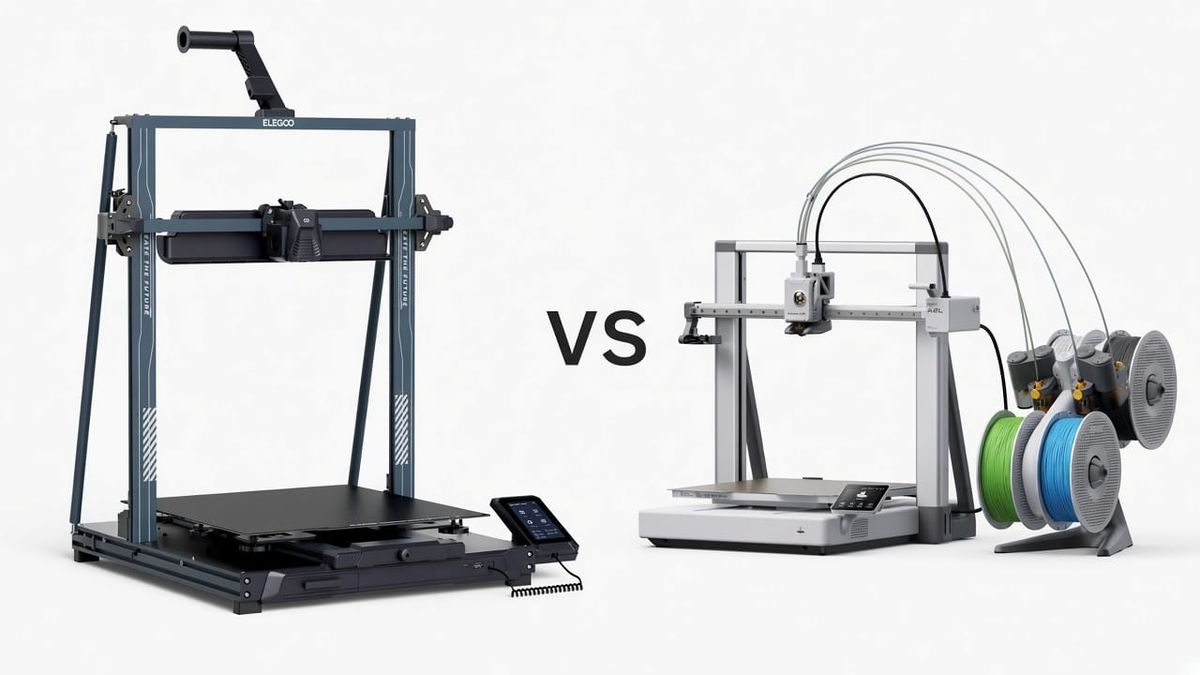
If you are looking for an affordable large-format 3D printer for beginners, two machines dominate the conversation in 2026: the Bambu Lab A2L ($569) and the Elegoo Neptune 4 Max (~$478).
Both are open-frame FDM bed-slingers. Both print fast. Both cost under $600. But they solve the "big 3D printer" problem in completely different ways.
The Bambu Lab A2L focuses on making large-format printing effortless. It auto-calibrates before every print, monitors for failures with a built-in camera and AI, runs quietly enough for an apartment bedroom, and supports up to 19-color printing through the AMS system. Its 330 x 320 x 325 mm build volume handles the vast majority of projects a beginner will tackle.
The Elegoo Neptune 4 Max focuses on maximum build space for minimum cost. Its 420 x 420 x 480 mm volume is roughly 2.5 times larger than the A2L, enough to print full-size cosplay helmets in one piece. But it ships without multicolor, without a camera, and with a learning curve that asks more from you as the operator.
For most beginners buying their first large 3D printer, the Bambu Lab A2L is the better choice. It gets you printing successfully on day one with fewer failures, less noise, and more creative options. The Neptune 4 Max earns its place if you specifically need the extra build volume and are comfortable with more hands-on setup.
This comparison breaks down exactly where each printer wins, where it loses, and which one fits your situation.
Quick Answer: Which Large Format 3D Printer Should Beginners Pick?
Best for most beginners: Bambu Lab A2L ($569). The combination of full-auto calibration, multi-color printing, silent operation, AI failure detection, and a polished software ecosystem means fewer failed prints and a smoother learning experience. At 330 x 320 x 325 mm, the build volume covers keyboards, large vases, cosplay masks, batch prints of 40+ small objects, and nearly every popular model on MakerWorld.
Best for maximum build space: Elegoo Neptune 4 Max (~$478). If you need to print full-size helmets, large architectural models, or oversized props in a single piece, the Neptune 4 Max's 420 x 420 x 480 mm volume cannot be matched at this price. Just know that it requires more setup time, more manual calibration, and more troubleshooting skill.
| Situation | Pick This |
|---|---|
| First large 3D printer, want reliability and ease | Bambu Lab A2L |
| Need to print full-size helmets or 400mm+ objects | Elegoo Neptune 4 Max |
| Want multi-color prints on a big printer | Bambu Lab A2L (AMS supports up to 19 colors) |
| Tightest possible budget for large format | Elegoo Neptune 4 Max (~$91 cheaper) |
| Live in an apartment or shared space | Bambu Lab A2L (<49 dB silent mode) |
| Want to cut stickers, vinyl, or draw with a pen | Bambu Lab A2L (cutting/pen modules) |
| Experienced with Klipper and want to tinker | Elegoo Neptune 4 Max (open Klipper firmware) |
Full Spec Comparison: Bambu Lab A2L vs Elegoo Neptune 4 Max
Here is every spec that matters, side by side.
| Spec | Bambu Lab A2L | Elegoo Neptune 4 Max |
|---|---|---|
| Build Volume | 330 x 320 x 325 mm (34.3 liters) | 420 x 420 x 480 mm (84.7 liters) |
| Max Speed | 500 mm/s | 500 mm/s (250 mm/s recommended) |
| Max Acceleration | 10,000 mm/s² | 8,000 mm/s² |
| Auto Leveling | Full-auto calibration (every print, including flow dynamics) | 121-point mesh leveling (may need manual Z-offset adjustment) |
| Multicolor | Up to 19 colors via AMS lite / 2nd-Gen AMS | None built-in (third-party kits available) |
| Camera | Built-in with AI failure detection (filament tangle, nozzle clumping, air printing) | None (external webcam via Klipper possible) |
| Noise (Silent Mode) | <49 dB (library quiet) | ~55 to 65 dB (loud desk fan at speed) |
| Extruder Type | PMSM closed-loop servo motor | Dual-gear direct drive (standard stepper) |
| Vibration Compensation | Adaptive (real-time, load-aware, recalibrates as print grows) | Input shaping (one-time calibration at startup) |
| Cutting / Pen Module | Yes (blade cutting for stickers/vinyl/fabric + pen drawing) | No |
| Slicer Ecosystem | Bambu Studio (polished, beginner-friendly, MakerWorld integration) | ElegooSlicer (OrcaSlicer-based) / Cura / PrusaSlicer |
| Max Nozzle Temp | 300 °C | 300 °C |
| Max Bed Temp | 80 °C | 85 °C |
| Connectivity | WiFi, LAN, Bambu Cloud, Bambu Handy app | WiFi, LAN, USB |
| Emissions Certification | UL 2904 GREENGUARD (indoor air quality certified) | None |
| Machine Size | 544 x 529 x 505 mm | 658 x 632 x 740 mm |
| Weight | 12.8 kg | ~18 kg |
| Price | $569 (standalone) | ~$478 |
Source: Bambu Lab A2L product page, Elegoo Neptune 4 Max product page
The numbers tell one clear story: the Neptune 4 Max wins on raw build volume, and the A2L wins on almost everything else.
Build Volume: Does 330mm vs 420mm Actually Matter for Beginners?
This is the biggest question in this comparison, so let me be honest about it.
The Elegoo Neptune 4 Max has a build volume of 420 x 420 x 480 mm. That is 84.7 liters. The Bambu Lab A2L has a build volume of 330 x 320 x 325 mm. That is 34.3 liters. The Neptune 4 Max is roughly 2.5 times larger. On paper, that gap looks massive.
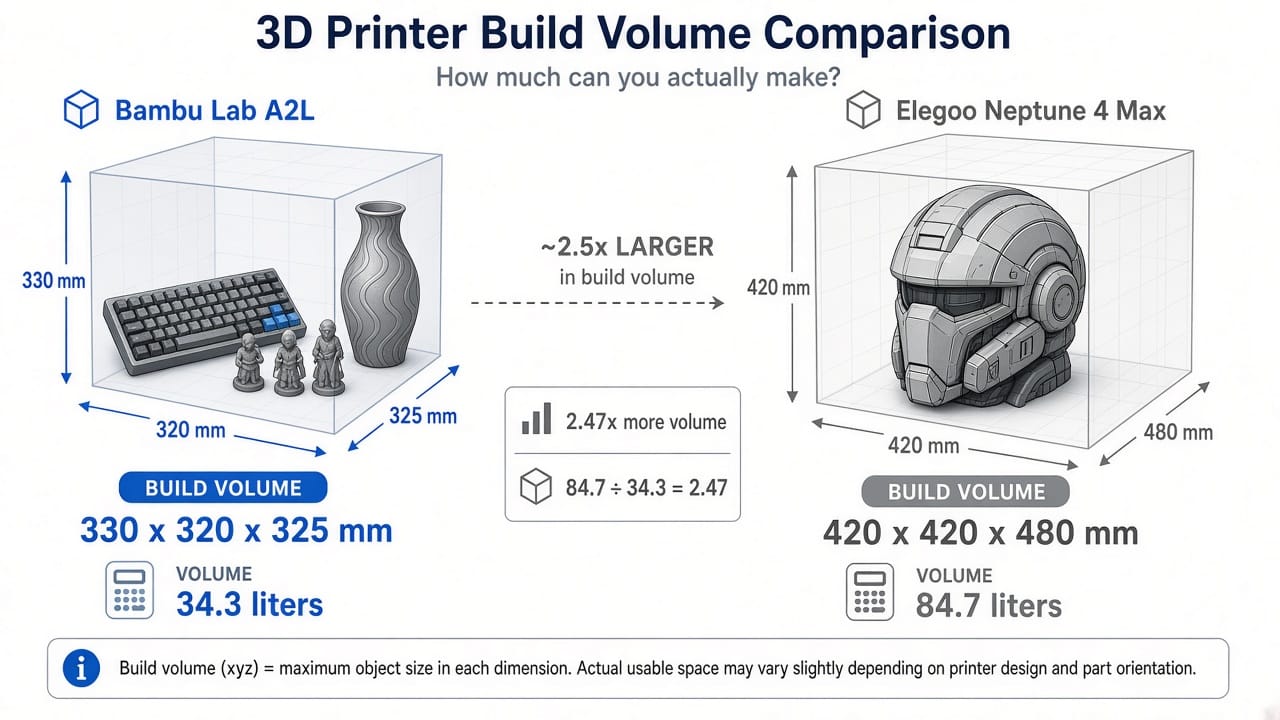
But here is what the raw numbers do not tell you: most beginners never fill a 420mm build plate.
I looked at the top 200 most-downloaded models on MakerWorld and Printables. Over 90% of them fit within 300mm in every dimension. The most popular prints for beginners are functional items (cable clips, phone stands, brackets), decorative objects (vases, figurines, desk organizers), and toys (articulated dragons, fidget toys, board game pieces). All of these fit comfortably on the A2L's 330mm bed.
What 330mm can handle: A full-size mechanical keyboard case in one piece. A 12-inch tall decorative vase. A cosplay half-mask. A batch of 30 to 40 keychains in a single run. A large storage bin. A drone frame. For our full guide to large format 3D printers, the A2L sits right in the sweet spot where you get meaningfully more space than a standard 256mm printer without the complications of a truly huge machine.
When 420mm genuinely matters: Full-size cosplay helmets (Mandalorian, Iron Man) printed as a single piece without splitting. Full-size shields or armor plates. Architectural models of buildings. Very large functional prototypes. If these specific projects are your primary reason for buying a large 3D printer, the Neptune 4 Max's extra volume is a real advantage.
The honest framing: the A2L's 330mm is large enough for most beginners. The Neptune 4 Max's 420mm is large enough for almost everything. But "large enough for most" costs $569 and comes with a complete automation stack. "Large enough for almost everything" costs $478 but asks you to do more of the work yourself.
Which Is Easier to Set Up? The First-Print Experience Compared
This is where the two printers feel like they are from different generations.
Bambu Lab A2L: Plug In and Print
The A2L arrives mostly assembled. You remove the packaging, place it on your desk, plug it in, and follow the touchscreen prompts. The printer runs full-auto calibration: bed leveling, vibration compensation, and Flow Dynamics Calibration (which measures exactly how filament flows through the nozzle today, with this spool, at this temperature). The entire process from unboxing to your first print takes about 15 to 20 minutes.
You do not adjust a Z-offset. You do not level a bed manually. You do not edit configuration files. The printer handles it.
After that first print, the A2L recalibrates automatically before every job. If you change filament brands, swap nozzle sizes, or come back after a week, the calibration is always fresh. For beginners who are still learning what "bed adhesion" and "infill percentage" mean, this hands-off approach prevents the frustrating first-week failures that make people give up on 3D printing.
Elegoo Neptune 4 Max: Assembly Required
The Neptune 4 Max requires partial assembly out of the box: mounting the gantry to the base, connecting cables, and installing the spool holder. This takes 30 to 45 minutes with the included tools and instructions. It is not difficult, but it is a step that does not exist with the A2L.
After assembly, you run the 121-point auto bed leveling. This works reasonably well, but many users report needing to manually fine-tune the Z-offset (the gap between the nozzle and the bed) to get consistent first layers. If the Z-offset is slightly off, your print either does not stick or the first layer is squished too flat. Getting this right requires a few test prints and some patience.
The Neptune 4 Max runs Klipper firmware, which is powerful and customizable but adds a learning curve. ElegooSlicer is capable, but the ecosystem is not as beginner-polished as Bambu Studio. Features like input shaping calibration, pressure advance tuning, and print mode selection (Silent, Normal, Sport) give you more control but also more decisions to make.
Bottom line on setup: If you want to spend your first weekend printing rather than calibrating, the A2L gets you there faster. If you enjoy tinkering and learning how your machine works, the Neptune 4 Max teaches you more about 3D printing mechanics along the way.
Can a Big 3D Printer Be Quiet Enough for an Apartment?
Large 3D printers are traditionally loud machines. Bigger beds move more mass, bigger fans push more air, and longer print times mean the noise runs for hours. If you share your living space with roommates, a partner, or pets, noise matters.
Bambu Lab A2L: Library Quiet
The A2L operates below 49 dB in Silent Mode. That is comparable to a quiet library or a whispered conversation. Even in Standard Mode, peak noise is about 52 dB. Bambu achieves this through active motor noise cancellation, precision linear rails, and intelligent fan scaling that adjusts cooling based on what the print actually needs rather than running fans at full blast constantly.
I have run overnight prints with the A2L in the same room where someone was sleeping. It is genuinely quiet enough for that. The servo motor is smoother than traditional stepper motors, and the adaptive vibration compensation reduces the mechanical chatter that makes most bed-slingers audible from the next room.
The A2L is also UL 2904 GREENGUARD certified for indoor air quality when used with Bambu's official PLA and PETG filaments. This means tested, ultra-low particle and VOC emissions. If you care about whether 3D printing is safe in a living space, the A2L is one of the few printers with third-party certification to back up the claim.
Elegoo Neptune 4 Max: Noticeable at Speed
The Neptune 4 Max is significantly louder. Reviews and user tests report noise levels between 55 dB and 65 dB depending on print speed, with high-speed printing producing a noticeable high-pitched whine from rapid direction changes and full-blast cooling fans.
At its recommended 250 mm/s speed, the Neptune 4 Max sounds like a loud desk fan, roughly 60 dB. That is fine in a workshop, garage, or dedicated maker space. It is less ideal for a bedroom, living room, or shared office.
The Neptune 4 Max does offer software-adjustable fan modes (Silent, Normal, Sport), and reducing fan speed to Silent mode (60% capacity, rear cooling fan off) helps. But even in its quietest setting, it is noticeably louder than the A2L's standard mode.
There is no emissions certification for the Neptune 4 Max. It is an open-frame printer like the A2L, but without independent testing to verify emission levels.
| Noise Comparison | Bambu Lab A2L | Elegoo Neptune 4 Max |
|---|---|---|
| Silent Mode | <49 dB | ~55 dB (fans at 60%) |
| Standard / Normal Mode | ~52 dB | ~60 dB |
| High Speed | ~52 dB | ~65 dB |
| Comparison | Quiet library | Loud desk fan to vacuum cleaner |
| Overnight printing in bedroom? | Yes | Not recommended |
| Emissions certified? | UL 2904 GREENGUARD | No |
Multicolor Printing on a Large Format 3D Printer
This is one of the clearest advantages the A2L has over the Neptune 4 Max, and it matters more than many spec comparisons suggest.
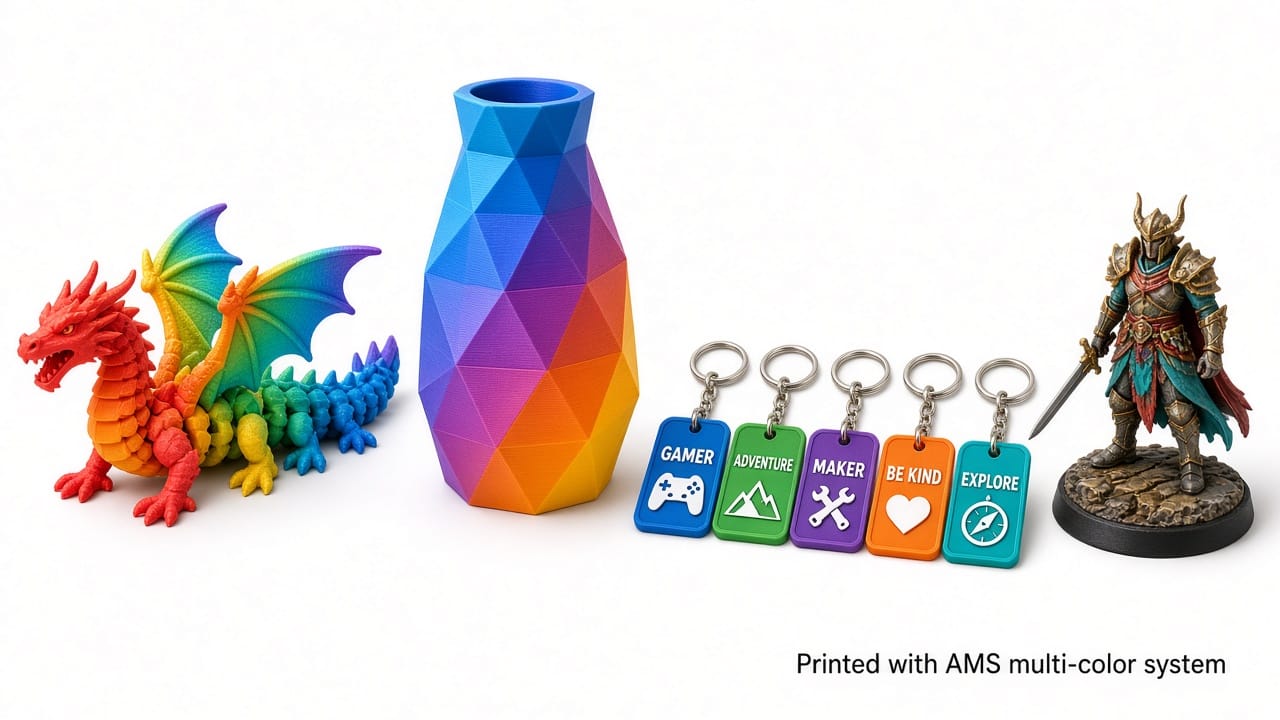
A2L: Up to 19 Colors, Built Into the Ecosystem
The Bambu Lab A2L supports the AMS lite (included in the Combo version) and the 2nd-Gen AMS. With one AMS lite unit, you get 4-color printing. Stack multiple units and you reach up to 19 colors in a single print.
The AMS system has been used by over a million Bambu users worldwide. The reliability is proven: clean color swaps, minimal purge waste, and the built-in filament cutter handles transitions smoothly. The 2nd-Gen AMS adds sealed, climate-controlled filament storage with on-demand drying, which prevents moisture-related print quality issues.
For beginners, multi-color printing transforms the experience. Instead of printing a gray dragon, you print a rainbow one. Instead of a plain phone case, you print one with a two-tone logo. The models on MakerWorld are increasingly designed for multi-color, and having AMS support means you can print them as intended. For more on multi-color techniques, see our guide on how to 3D print in multiple colors.
Neptune 4 Max: Single Color by Default
The Neptune 4 Max ships as a single-extruder, single-color machine. Elegoo offers a compatible AMS unit, but compatibility and availability vary, and it is a separate purchase.
Third-party multi-color upgrade kits (like Co Print's KCM Set) work with Klipper-based printers, but they add $100 to $200+ to the total cost, require installation and configuration, and do not match the reliability of Bambu's integrated AMS system.
For most beginners, the practical difference is that the A2L prints in color out of the box (with the Combo version), while the Neptune 4 Max prints in whatever single color filament you load.
Beyond Printing: The A2L's Blade Cutting and Pen Drawing
This feature has no equivalent on the Neptune 4 Max or any other large-format printer in this price range.
The Bambu Lab A2L supports modular tool head covers that swap the print nozzle for a blade cutting module or a pen drawing module. With the cutting module installed, the A2L cuts stickers, vinyl decals, leather, fabric, and paper. With the pen module, it draws designs directly onto surfaces.
The "Print then Cut" workflow is particularly clever: print a 3D object, then use your phone camera (via Bambu Handy) to align a cutting path, and the A2L cuts a perfectly fitted decal or label for the object you just printed.
This turns the A2L from a 3D printer into a multi-purpose fabrication tool. If you are interested in craft projects, custom stickers, leather work, or any combination of 3D printing and 2D cutting, no other printer in this price range offers this capability.
Smart Features: Camera, AI Detection, and Remote Monitoring
When a large-format print fails, the consequences are bigger than with a standard printer. A failed 20-hour helmet print wastes $15+ in filament and an entire day of print time. Smart monitoring features are not just nice to have at this scale. They are a practical safeguard for your time and material.
A2L: Built-In Intelligence
The A2L includes a built-in camera paired with Bambu's trained AI algorithms. The system actively monitors for:
- Filament tangle detection: Catches tangled spools before they cause a jam
- Air printing detection: Identifies when the nozzle is extruding into empty space (no filament coming out)
- Nozzle clumping detection: A physical sensor detects when melted filament builds up on the nozzle tip
- Filament runout detection: Pauses when the spool runs out
When any issue is detected, the A2L pauses automatically and sends a notification to the Bambu Handy app on your phone. You can check the camera feed remotely, decide whether to resume or cancel, and avoid wasting hours of print time on a doomed job.
The PMSM closed-loop servo extruder also provides active monitoring of the extrusion path, detecting anomalies that stepper-based extruders miss because they have no feedback on whether filament is actually moving.
Neptune 4 Max: Basic Sensors
The Neptune 4 Max includes a filament runout sensor and LED lighting for the build area. It does not have a built-in camera or AI-based failure detection.
You can add a webcam through Klipper's web interface (Fluidd or Mainsail) for remote monitoring, but this requires purchasing an external camera, mounting it, and configuring the software. The monitoring is visual only, with no automated pause-on-failure capability.
For beginners who might not know what a failed print looks like until hours have passed, the A2L's automated detection is a meaningful safety net.
How Much Does an Affordable Large 3D Printer Really Cost?
The sticker price tells part of the story. The total cost of ownership tells the rest.
| Cost Factor | Bambu Lab A2L | Elegoo Neptune 4 Max |
|---|---|---|
| Machine price | $569 (standalone), ~$669 (Combo with AMS lite) | ~$478 |
| Multi-color upgrade | Included in Combo / $100 for AMS lite add-on | $100 to $200+ (third-party kits, not official) |
| Failed print waste (estimated) | Lower (AI detection catches failures early) | Higher (no automated detection, large prints waste more material) |
| Electricity (large prints) | Lower (330mm bed heats faster, less power) | Higher (420mm bed draws more power, longer heat-up time) |
| Accessories needed | Minimal (ready to print out of box) | External webcam (~$30), possible enclosure for ABS/ASA |
| Software | Bambu Studio (free, polished) | ElegooSlicer (free), or OrcaSlicer/Cura (free) |
| Filament | Standard 1.75mm (same for both) | Standard 1.75mm (same for both) |
The price gap narrows quickly when you factor in the A2L's included features. A standalone A2L at $569 costs $91 more than a Neptune 4 Max at $478. But adding an external webcam, a third-party multi-color kit, and accounting for higher failed-print waste on the Neptune can easily eat that $91 difference.
If you compare the A2L Combo (with AMS lite) to a Neptune 4 Max with an added multi-color kit, the total costs are comparable, but the A2L system is integrated and proven while the Neptune setup is cobbled together from separate products.
For a broader look at 3D printing expenses, see our full guide on how much 3D printing costs.
What About Other Affordable Large 3D Printers?
The A2L and Neptune 4 Max are not the only options. Here is how they compare to other popular large-format FDM printers.
| Printer | Build Volume | Price | Key Advantage | Key Limitation |
|---|---|---|---|---|
| Bambu Lab A2L | 330 x 320 x 325 mm | $569 | Best automation + multicolor ecosystem | Smaller volume than competitors |
| Elegoo Neptune 4 Max | 420 x 420 x 480 mm | ~$478 | Largest volume per dollar | Loud, no camera, no multicolor |
| Anycubic Kobra 3 Max | 420 x 420 x 500 mm | ~$459 | Even larger volume, 600 mm/s speed | Loud, steep learning curve, huge footprint |
| Creality K1 Max | 300 x 300 x 300 mm | ~$599 | CoreXY enclosed, good speed | Smaller volume, not true "large format" |
| Elegoo Neptune 4 Plus | 320 x 320 x 385 mm | ~$269 | Cheapest large-format option | Fewer features, older design |
| Bambu Lab H2S | 330 x 330 x 400 mm | $1,299+ | Enclosed, AMS, CoreXY, heated chamber | Much more expensive |
If your budget is under $300, the Neptune 4 Plus at ~$269 is the cheapest way into large-format FDM printing. If your budget stretches above $1,000 and you want an enclosed chamber for engineering materials, the Bambu Lab H2S is the premium choice.
But in the $400 to $600 range where most beginners shop, the A2L and Neptune 4 Max represent the two clearest philosophies: smart automation versus raw build space.
Best For: A2L vs Neptune 4 Max Final Verdict
After comparing every spec, feature, and real-world consideration, here is the verdict.
Best for most beginners: Bambu Lab A2L. It auto-calibrates, monitors itself, prints quietly, supports multi-color, offers cutting and pen modules, and fits on a normal desk. The 330 x 320 x 325 mm build volume is 105% larger than the standard 256mm class and handles the vast majority of beginner projects. You spend your time designing and printing, not troubleshooting and calibrating. For our detailed review, see the full Bambu Lab A2L review.
Best for maximum volume on a budget: Elegoo Neptune 4 Max. If you have a specific, recurring need for 400mm+ prints (full helmets, large props, oversized prototypes), the Neptune 4 Max delivers 2.5 times the build volume for $91 less. It rewards users who enjoy learning their machine and are comfortable with Klipper. It is a capable printer that asks more from its operator.
| Your Situation | Recommended Printer |
|---|---|
| First-time buyer, want the smoothest experience | Bambu Lab A2L |
| Printing in an apartment, bedroom, or office | Bambu Lab A2L (49 dB, GREENGUARD certified) |
| Want multi-color right away | Bambu Lab A2L Combo (4-color with AMS lite) |
| Interested in cutting stickers, vinyl, or pen drawing | Bambu Lab A2L (unique multi-tool capability) |
| Need to print full-size helmets in one piece | Elegoo Neptune 4 Max (420mm bed) |
| Budget is the top priority | Elegoo Neptune 4 Max (~$478) |
| Enjoy tinkering with Klipper and firmware | Elegoo Neptune 4 Max (open Klipper) |
| Want the largest possible single-piece prints | Elegoo Neptune 4 Max (84.7 liters) |
| Want a reliable daily driver that just works | Bambu Lab A2L |
Most beginners do not need 420mm. Most beginners do need a printer that works reliably from day one, catches its own mistakes, and does not wake up the household. That is the A2L.
FAQ
What Is the Largest a 3D Printer Can Print?
Consumer desktop 3D printers top out around 420 to 500 mm in their largest dimension. The Elegoo Neptune 4 Max (420 x 420 x 480 mm) and Anycubic Kobra 3 Max (420 x 420 x 500 mm) are among the largest affordable options. Industrial large-format 3D printers can print objects over 1,000 mm (1 meter) in size, but they cost $10,000 to $500,000+. For beginners, a build volume in the 300 to 420 mm range covers nearly every project you will realistically tackle. The Bambu Lab A2L at 330 mm is the entry point to large-format; the Neptune 4 Max at 420 mm is near the top of what consumer printers offer.
How Much Does a Giant 3D Printer Cost?
Affordable large-format FDM 3D printers cost between $270 and $700 in 2026. The Elegoo Neptune 4 Plus (~$269) is the cheapest large-format option. The Bambu Lab A2L ($569) and Elegoo Neptune 4 Max (~$478) sit in the mid-range. Premium large-format printers like the Bambu Lab H2S start around $1,299. Industrial large-scale 3D printers (build volumes over 500mm) range from $5,000 to over $500,000 depending on technology and size. For most beginners, $400 to $600 buys a very capable large 3D printer.
What Is the Best 3D Printer for Larger Prints?
For beginners who want the easiest experience with a large build volume, the Bambu Lab A2L ($569, 330 x 320 x 325 mm) is the best overall choice. It offers full-auto calibration, multi-color support, silent printing, and AI failure detection. For users who need the absolute largest build space at the lowest price, the Elegoo Neptune 4 Max (~$478, 420 x 420 x 480 mm) provides roughly 2.5 times more volume. The Anycubic Kobra 3 Max (~$459, 420 x 420 x 500 mm) is another strong option for maximum volume. The best choice depends on whether you prioritize ease of use (A2L) or raw build space (Neptune 4 Max or Kobra 3 Max).
Are Large 3D Printers Worth It?
Large 3D printers are worth it if you regularly need to print objects bigger than 250 mm, want to print multiple objects in a single batch, or plan to tackle projects like cosplay props, home decor, or large functional parts. The ability to print big objects in one piece eliminates the need to split models, glue sections together, and sand visible seams. However, large printers take up more desk space, use more electricity, and large failed prints waste more filament. If most of your prints are small (under 200 mm), a standard-size printer like the Bambu Lab A1 ($399) is more practical and affordable. For useful tools and accessories that improve your large-format printing experience, check our dedicated guide.